Turning a Google TV Box into an Ad-Free Streamer and Family Photo Frame
Table of Contents
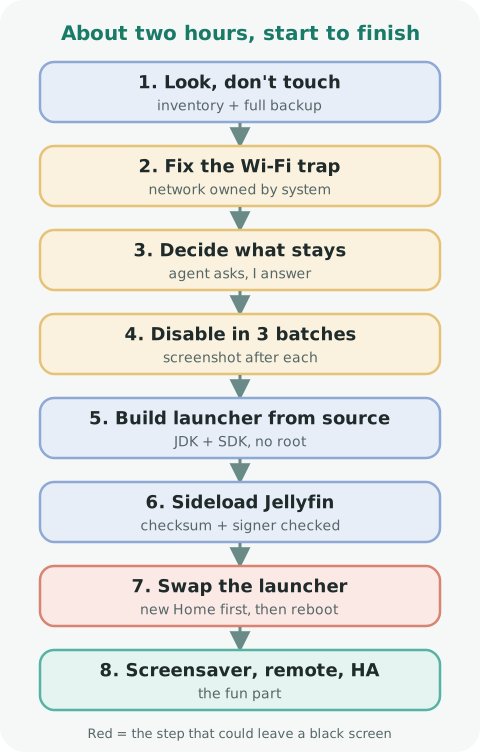
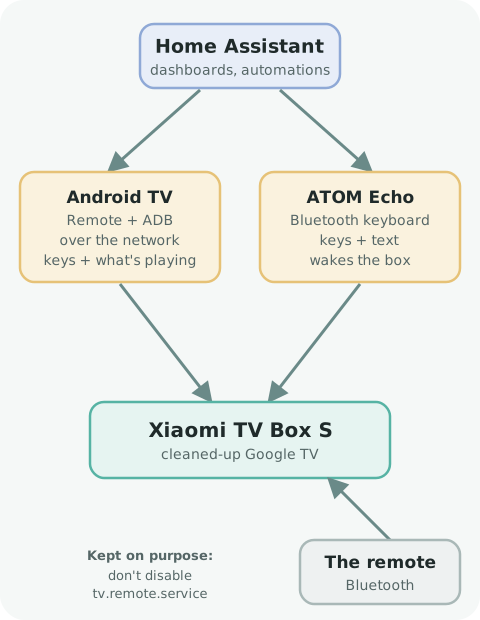
How I used the open-source cleanyourtv project and Claude Code to strip the ads and telemetry off a used Xiaomi TV Box S, then added Jellyfin, a photo screensaver from Immich, remapped remote buttons, Home Assistant control and an ESP32 Bluetooth keyboard that wakes the box. On LINUX Unplugged episode 690 they mentioned cleanyourtv, an open-source project that promises to "debloat any Android or Google TV over Wi-Fi and get an Apple TV-style home." They linked the box they used, a Xiaomi TV Box S (3rd gen), and I picked one up used for under $80. Out of the box it's a capable streamer buried under sponsored rows, Xiaomi promo tabs and analytics. About two hours later it looked like this: It's going to replace the Kodi box in my family room, which keeps having video driver problems and losing sound when the TV turns off and on. Kodi's best feature was a screensaver showing only photos of my kids from my self-hosted Immich, so the new box had to do that too. It's a repo meant to be driven by an AI coding agent. You point the agent at The rules are what sold me: I ran Claude Code on a Linux machine on my network, talking to the box over ADB (turned on under Developer options). My ground rules: look before touching, back up everything, ask me what to keep, and take a screenshot after every stage. This is the one I'd never have caught myself. On Google TV, the setup wizard ( The agent checked before touching anything: The fix was low-tech: forget the network on the TV and join it again. If you try this, check who owns your Wi-Fi first. The agent asked before acting. I kept every streaming app, and when I said "get rid of all the Xiaomi stuff," it pushed back, because some of it is the box's plumbing: Then it disabled things in three small batches, with a screenshot after each: The launcher has to be built from source. My machine had no Java or Android tools, so with my OK the agent installed them in my home folder, checking every download against its published checksum. It did the same for Jellyfin, pulling the official release and confirming it was signed by the Jellyfin team. Then the swap, in order: confirm the new launcher is Home, disable the stock one, reboot. It came back in about 70 seconds on the new home screen. I already run immich-kiosk, which shows an Immich slideshow in a browser. It can filter by person right in the URL and overlays the date, location and weather. So can a screensaver just be a web page? Not directly. Android TV has no "screensaver = URL" setting. So the agent wrote a tiny app (27 KB) that shows any web page full-screen as the screensaver. It's made for my box and I'm not publishing it, but it's a small enough job that any coding agent could rebuild it. If my server is down, it falls back to Wikimedia Commons' featured landscape and city photos: free, properly licensed, no API key, and a decent stand-in for Apple TV's aerial views. It switches back once the server returns. I set it to start after 3 minutes and never let the TV sleep. That's fine on an LCD; on an OLED, think about burn-in from the clock overlay. The agent also added a "Screensaver" tile to the home screen, so I can change the page, the delay and the sleep time with the remote instead of ADB. With the stock launcher gone, some buttons stopped working. cleanyourtv's notes for this remote already had the button codes, so the launcher's key helper remapped them: Test these with the real remote. A simulated keypress takes a different path and proves nothing. Home Assistant's Android TV Remote integration wouldn't pair. Remember While checking, the agent noticed that the Assistant, which it had disabled, was back on. Most likely a Play Store update re-enabled it. Re-enabling Home Assistant's network routes stop answering once the box goes to sleep. The physical remote wakes it over Bluetooth, so I wanted Home Assistant to do the same. I set up an M5Stack ATOM Echo, a tiny ESP32, as a Bluetooth keyboard with esphome-blekeyboard. The project ships ready-made packages, so the ESPHome config is short: Pair it on the box under Settings → Remotes & Accessories → Pair accessory. Home Assistant gets buttons for navigation and media keys, and a keypress wakes the box when the network routes have gone quiet. cleanyourtv recommends turning ADB off when you're done: network ADB is unencrypted and gives full control of the box. I'm leaving it on because Home Assistant uses it, and the box sits on an isolated VLAN. If you don't need it, turn it off. Everything else can be undone. Nothing was uninstalled, so the repo's Yes. It boots straight to my apps, Home Assistant can wake and control it, every remote button does something useful, and after 3 minutes it becomes a photo frame of my kids. Thanks to Gathin23 and the cleanyourtv contributors, the Immich, immich-kiosk and Jellyfin folks, and the LINUX Unplugged crew for the tip. Thanks for reading.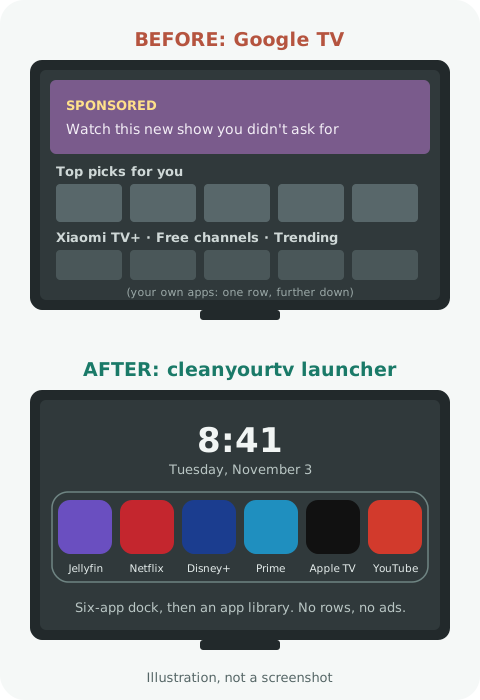 Roughly what changed. No rows, no recommendations, no ads.
What I Wanted
What cleanyourtv Is
PROMPT.md, tell it your TV model, and it follows a written, safety-first procedure. It includes tested debloat lists for specific models (my exact box already had one), scripts to disable and restore apps, and a small Apple TV-style launcher you build from source, with no internet permission and no analytics.restore.sh. No root, nothing flashed. The Setup
The Wi-Fi Trap
setupwraith) can own your saved Wi-Fi networks, and Android deletes an app's networks when you disable it. The wizard has to be disabled before the launcher can be swapped, so the obvious next step would have knocked the TV off Wi-Fi mid-job.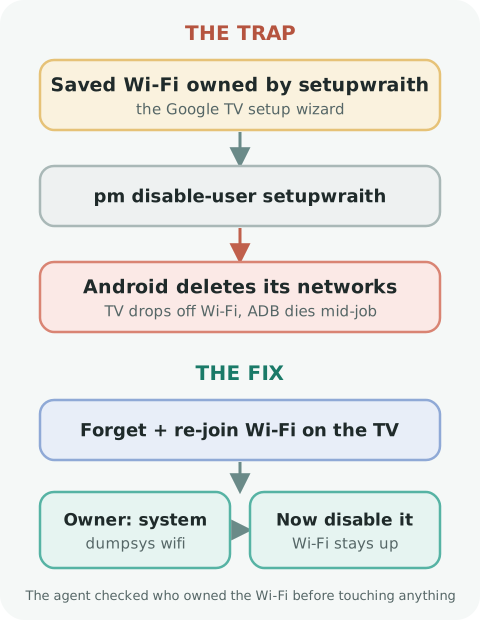
adb shell dumpsys wifi | grep cname= Deciding What Stays
Stays Why mitv.serviceThe core TV service com.mi.bluetoothThe remote and pairing com.droidlogic*The chip layer The firmware updater Security updates Play Store, Play Services, Chromecast Apps and casting need them adb shell pm disable-user --user 0 com.miui.tv.analyticskatniss) and tv.remote.service. Remember that last one. Launcher and Jellyfin
A Screensaver That's Just a Web Page
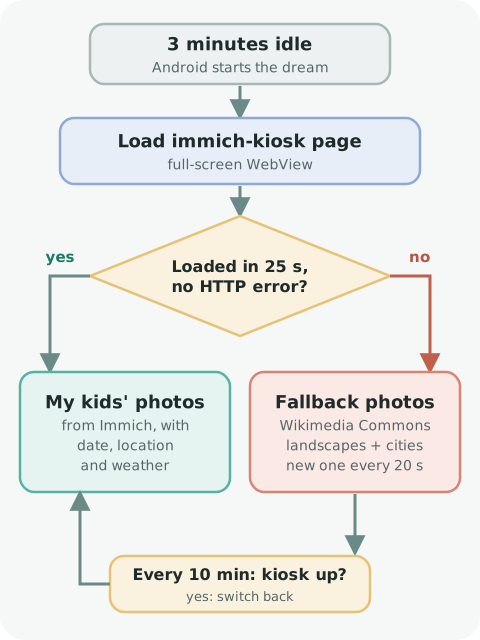
adb shell settings put system screen_off_timeout 180000
adb shell settings put secure sleep_timeout -1 Fixing the Remote Buttons
Button Now opens Xiaomi TV+ Jellyfin YouTube YouTube Apps The app library The Home Assistant Surprise
tv.remote.service? It isn't just voice. It's the network remote that Home Assistant and the Google TV phone app use.tv.remote.service and disabling katniss again fixed both, and Home Assistant paired after a few tries. An ESP32 Bluetooth Keyboard to Wake It
esphome:
  name: google-tv-remote

esp32:
  board: m5stack-atom
  framework:
    type: esp-idf

logger:
api:
ota:
  - platform: esphome

wifi:
  ssid: !secret wifi_ssid
  password: !secret wifi_password
  power_save_mode: none

external_components:
  - source:
      type: git
      url: https://github.com/HomeOps/esphome-blekeyboard
      ref: v0.8.0
      path: components
    components: [ble_keyboard]

packages:
  keyboard:
    url: https://github.com/HomeOps/esphome-blekeyboard
    ref: v0.8.0
    files: [packages/keyboard.yaml]
  media_keys:
    url: https://github.com/HomeOps/esphome-blekeyboard
    ref: v0.8.0
files: [packages/media_keys.yaml] Lessons Learned
tv.remote.service. A Word About ADB
restore.sh re-enables every package, and if Home is ever black:adb shell pm enable com.google.android.apps.tv.launcherx Was It Worth It?