Cleaning Up Six Years of Home Assistant with Claude
Table of Contents
- Step Zero: Get It Into Git
- How Changes Got to the House
- Letting Claude See the Running House
- First, a Review
- The Rules
- Merging Automations, With Proof
- Stop Polling Everything
- Faster, Too
- Watchdogs That Back Off
- Bugs Hiding in Plain Sight
- Voice Got a Lot Smarter
- A Detour: Packages vs. the UI
- By the Numbers
- So, How Was Working With Claude?
- What's Left
How I took a Home Assistant install with 421 automations, a few security holes and a lot of polling, put it in Git, and cleaned it up with Claude Code without breaking anything my family relies on. My Home Assistant setup has been running since at least 2020. Some of my automations still have IDs like By this fall it had 421 automations and 206 scripts. Two versions of my voice media controls (v7 and v8) were both turned on, so saying "volume up" turned the volume up twice. One automation ran every single second, all day, just to refresh a sensor. And I had a sneaking suspicion that a few things only worked by accident. It worked, mostly. My family uses it every day. And that was exactly why I never wanted to touch it. So I did what I did with this blog: I sat down with Claude, an AI from Anthropic, and we cleaned it up together. Claude did most of the reading, writing and testing. I made the decisions, answered a lot of questions about my house, and pasted commands into my server. Here's how that went. Before anything else, the config had to go into Git. My Home Assistant runs in Docker, and the config folder is just a folder on the server. Turning it into a Git repo means every change becomes a commit: I can read it, ask questions about it, and roll it back. The catch is that a Home Assistant config folder is full of things that should never leave the house: A few things worth pointing out: That way, if some integration drops a new file full of credentials in there next year, Git ignores it by default. The private repo lives on GitHub, which is also where Claude works from. Claude Code has a cloud version that clones a repo into a sandbox, works on its own branch, and pushes there. That turned out to be the key to this whole project. I didn't want an AI anywhere near my live Home Assistant, and it never was. Claude worked on a copy of the config in the cloud. It could install the exact same Home Assistant version I run, load my YAML into a throwaway instance with fake secrets, and test things against that. It never had a token for my house. Every round ended with a block of commands for me to paste on the server, something like this: Pull the branch, let Home Assistant check its own config, restart, apply the "plan" (more on that in a second), and push the result back to Not everything lives in YAML files. Entity names, areas, helpers, automation categories, which entities are exposed to voice: all of that is stored in Home Assistant's Normally that means clicking around the UI. With 180 automations getting deleted or merged, that's a lot of clicking, and a lot of chances to click the wrong thing. So Claude wrote a small script, By default it's a dry run. It prints exactly what it would change and changes nothing. Only The YAML in Git is only half the picture. It says what an automation should do, but not what's actually out there: which entities exist, which are unavailable, which automations I'd disabled in the UI years ago, which helpers a dashboard still uses, what's in the error log. Claude had no way into my house, so it needed me to bring the house to it. That's what a handful of small, read-only Python scripts are for. They all run on the server, inside the Home Assistant container, and none of them changes anything. The important part is what it leaves out. It only reads an allowlist of That last zero is the one I like to see: the earlier redaction steps had already caught everything, so the safety net had nothing left to remove. I run it, hand Claude the file, and Claude can answer questions like "is anything still using Three smaller scripts filled in the gaps: Before changing anything, Claude read the whole thing and wrote a review: a 500-line Security went first. One of my automations would unlock a door if someone arrived home and then anything moved near a door in the next ten minutes, including a cat or a delivery driver. It's been replaced with a proper "arrival window" that only unlocks the door the person is actually at, closes after the first unlock, and sends me a notification every time it does. The voice PIN unlock now only accepts the PIN from the speaker that asked for it, and locks itself out after three wrong tries. The most useful thing I did in this whole project was write down some rules before any of the big changes. They live in a Family first. Automations should feel helpful, never commanding or overbearing, especially for the kids. Every way a family member already interacts with the house must keep working: wall switches, Hue app, buttons, voice phrases, dashboards. Changes may only add things to learn, never take any away. If a change would alter something a person would notice, ask first and explain it in family terms. And the second most important one: refactors have to be proven to behave exactly like the original, and real bug fixes are done separately and called out one by one. That one changed how the rest of the project went. A lot of my automations came in pairs. "Laundry room lights on with motion" and "Laundry room lights off when motion stops." Kitchen, hallway, attic, master bath: same thing, two automations per room. Home Assistant can do both in one automation using trigger IDs and a Here's the trick that made me trust it: for every merge, Claude spun up a test instance of Home Assistant with the old automations and another with the new one, with every service call stubbed out so nothing real happened. Then it fed both the same random sequence of motion and light changes (with the 10-minute delays sped up to 1 second) and compared every single service call. They had to match exactly. The door auto-locks got the most thorough version of this. Nine automations ran the front and back door countdowns (start when the door closes, cancel when it opens, lock when the timer ends, restart at 10 minutes on arrival), and they became one per door. To check it, Claude modeled the old nine and the new two, and ran both through 40,000 random sequences of doors opening, locks changing, people arriving, Home Assistant restarting and time passing. They locked at exactly the same moments every time. I'll admit that when I saw "40,000 simulations" go by for my back door, I laughed out loud. Is that overkill for a door lock? Absolutely. It's also the automation I least want to be wrong about, and it cost me nothing but a few minutes of waiting. It also knew when not to merge. One of my kids' bedroom lights and the half bath both end with a long The merges, all told: A few of these deserve a closer look. I have ESPHome wall dimmers in most rooms. Each room had its own "light switch control" automation for what the up and down buttons do, and a separate "sync" automation per switch that checked every 5 seconds whether the switch and the bulbs agreed. That's well over a dozen automations, all doing roughly the same thing with slightly different copy-paste. Now there's one "Light switch buttons" automation. Each switch's button events are a trigger with an ID, and a small table says which lights that switch controls. The syncing moved into the switches themselves (more on that below). Claude simulated all 9 switches with all 4 button commands, old and new, and the light calls matched exactly. That one merge removed about 660 lines. This one wasn't a merge so much as a rewrite, because the old automations disagreed with each other. My attic office has a window AC that only understands an IR "power toggle," which I can't tell is on or off except by looking at its smart plug's power draw. Seven automations all poked at it: some changed the thermostat's target on every presence blip, some switched the AC directly behind the thermostat's back. With a button that only toggles, anything that acts without checking can just as easily turn the AC off as on. Now one automation, "Attic climate," is the only thing that sets the attic's target temperature: 72 when someone's up there, 80 when it's empty. It only acts when that changes, so if I set it to 70 by hand, it stays at 70 until I leave. The actual on/off goes through one script that only sends the IR toggle if the plug says the AC is in the wrong state, waits up to a minute to see it worked, and tries once more if not. The basement heater got the same treatment: five automations became one. The biggest automation I have left is "Voice: Media Controls" at about 1,200 lines and 44 sentence triggers. It handles "pause," "skip," "volume up," "stop the music in the kitchen" and so on, figures out which room you meant, and asks an LLM "did you mean…?" when it can't tell. When we started, there were two copies of it running at once (v7 and v8), plus a separate "Stop All Media" automation that also fired on "stop." It's one automation now. It's big, but it's one big thing in one place, instead of three things quietly fighting. This was the big one for me. A lot of my automations had a Added up, my Home Assistant was running about 270 scheduled automations per minute, roughly 389,000 a day, mostly to check things that hadn't changed. The fix was to react to things changing instead of constantly asking if they changed. For my ESPHome light switches, the "sync" moved into the switch firmware itself: the dimmer just follows its room's light. For the rest, a template trigger fires only when the two sides actually disagree for a few seconds. A template trigger only fires when its result changes, so there's nothing left to poll. Now it's about 4 runs a minute, and those few are deliberate 1–5 minute safety nets. That's about 66 times fewer scheduled runs. Cleaner code is nice, but what I actually notice day to day is that the house is quicker and less busy. A few of the speed-ups: I have a bunch of automations that restart things when they go down: the UPS monitor, the Ring bridge, my fridge's integration, cameras. They all worked the same way: if it's down, restart it. Five minutes later, if it's still down, restart it again. And again. Forever. Now there's one shared script, While we were in there, it turned out one automation restarted a couple of services and rebooted my Frigate container every time Home Assistant started, whether they needed it or not. That's gone too. Since everything was being compared and simulated anyway, a lot of old bugs fell out. Here are some favorites. My porch lights are supposed to turn on during the day when it's gloomy. The old check looked like this: That reads fine in English. But When we both left the house, Home Assistant was supposed to set the Nest thermostat to "away." But the trigger fired when the first person left. Another automation, which puts Nest back to "home" when anyone is home, immediately undid it. Then when the second person left, nothing fired at all. So Nest never found out the house was empty. It now waits until nobody is home, and since the kids can be home without us, "nobody" also means the downstairs cameras haven't seen a person for 30 minutes. The window AC in my attic office shares a circuit with my laser printer, so the AC is supposed to pause while the printer heats up, or the two of them trip the breaker. The old automation only paused the AC if the AC was drawing more than 600 W. Its compressor draws 400 to 500. So it never paused anything. This one was Claude's mistake, and it's my favorite lesson from the whole project. During one of the merges, a single trigger ID got indented one level too far. That turned it into a condition instead of part of the trigger. Home Assistant's It turns out I have voice satellites in most rooms: Home Assistant Voice PE units and a couple of Linux boxes. Voice had the messiest problems of all, because of one thing I didn't know: When you say something, every automation with a matching sentence fires. And they all run before Home Assistant's built-in commands, so they block those too. My media controls automation had sentences like To find all of these, Claude took every sample sentence from every voice trigger in my config (2,823 of them) and ran each one through Home Assistant's own conversation agent to see which automations it actually reached. Then fixed them until every sentence only went where it was supposed to. Room names now have to come after a fixed word like "in," so the wildcard can't swallow the rest of the sentence. Years ago, before Home Assistant had built-in voice timers, I built my own: 9 automations, 2 scripts, 16 timers, and 32 helpers. Today every one of my satellites supports Home Assistant's built-in timers, which do everything mine did and more. The catch was the family. Everyone was used to saying things their way, like "set a pasta timer for 5 minutes" or "how many timers do I have." Following rule #1, none of those could stop working. So the old system was replaced with a small file of extra phrasings for the built-in timers: Out of the 312 phrasings the old system understood, 310 still work. The two that don't collided with "remove 5 minutes from the timer," which seemed like a fair trade. Not everything went in a straight line. Early on, Claude moved most of my automations out of So they went back. Now Claude also rewrote both files using Home Assistant's own YAML writer, converted to the current syntax ( Since every change is a commit, Git keeps score. The first commit, my config exactly as it was, went in on a Saturday at 2 pm. The last one in this round landed Monday at 4 pm. In between: 103 commits in about 50 hours (13 on Saturday, 36 on Sunday, 54 on Monday). Across those commits, about 46,400 lines were added and 54,000 removed. That overstates it a little, because one commit rewrote both Even after all of this, the house is big: today Home Assistant knows about 7,812 entities on 793 devices, across 256 integrations and helpers. Here's what went away along the way: What got added is mostly tooling: 38 plans, a validator, a side-by-side comparison script, the voice routing checker and the read-only export scripts: about 1,800 lines of new Python in all. That's the part I expect to keep using. Honestly? Great, with some caveats. What it was good at: What it needed from me: It also made mistakes: the indentation bug above, the packages detour, and one plan run that failed because Home Assistant's registry was bigger than the websocket library's 4 MB default message size. None of those made it past the dry run or the validator into something my family noticed, which is the whole point of building it this way. There's still a short list in The wall tablets got the same treatment, and I wrote that one up separately: Rewriting My Home Assistant Dashboards in Plain HTML. If you've got a Home Assistant install that's been growing for years and you're scared to touch it, I'd really recommend this approach: get it into Git, write down your rules, and make every change prove itself before it goes anywhere near your house. Let me know in the comments if you have questions. Thanks for reading.1588516677003, which is just the time I clicked "save" in May 2020. Since then I have added a little bit at a time and removed basically nothing.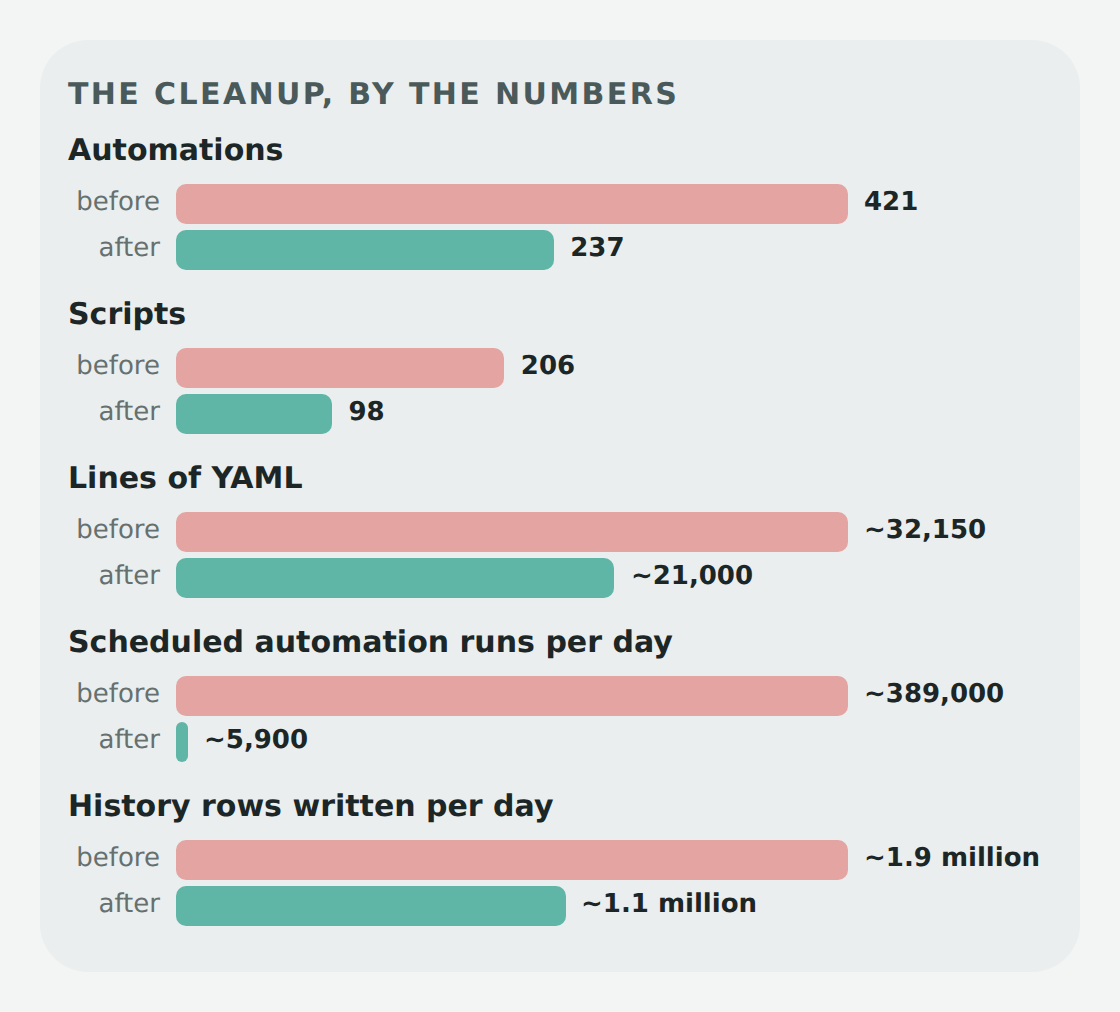 The end result, after 103 commits over three days
 Step Zero: Get It Into Git
secrets.yaml, the .storage folder (which has tokens in it), the database, logs, SSH keys, camera snapshots, and whatever else integrations have dropped in there over six years. A normal .gitignore lists the things to leave out, which means anything you forgot about goes in. Mine works the other way around: it ignores everything and then opts in only the files I actually want tracked. Here it is, trimmed a little:# ALLOWLIST: ignore everything, then opt in what we track
/*
# repo files
!/.gitignore
!/README.md
!/REVIEW.md
!/CLAUDE.md
!/.github/
# top-level config and scripts
!/*.yaml
!/*.py
# folders
!/packages/
!/blueprints/
!/themes/
!/python_scripts/
!/scripts/
!/custom_sentences/
# www: ignore its contents, allow only code
!/www/
/www/*
!/www/dashboard/
!/www/intercom-card.js
!/www/icons/
# RE-EXCLUDE anything sensitive that matches the allows above.
# These must stay below the allows.
/secrets.yaml
**/secrets.yaml
/known_devices.yaml
/ip_bans.yaml
*.backup*
*.bak
*.db
*.db-*
*.log*
.env
*.pem
*.key
id_rsa*/* comes first. Every file and folder at the top level is ignored until a ! line lets it back in.www/ gets the same treatment one level down. That folder is where Home Assistant serves files from, so it collects camera snapshots and downloaded images. Only my dashboard code and a couple of icons and cards are tracked.!/*.yaml would happily let secrets.yaml in, so it's ignored again below the allow. Order matters in a .gitignore: the last matching line wins..storage/, the database and my ESPHome folder are never mentioned at all, so they're never tracked.secrets.example.yaml with every key my config expects and fake values. It's what lets Claude load my config without the real secrets (more on that below). How Changes Got to the House
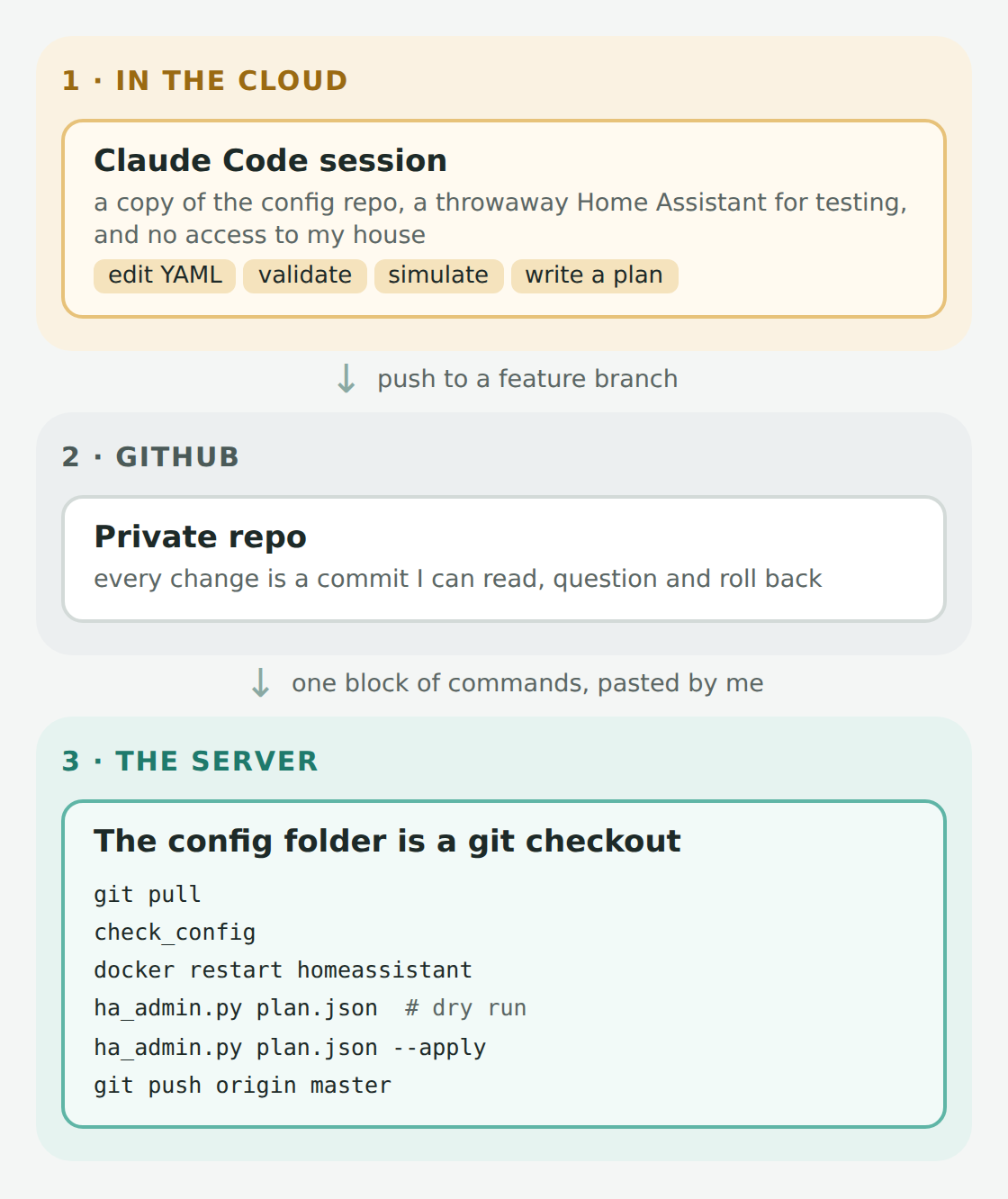 The loop for every change. The only step that touches the house is the one I paste.
cd ~/docker/homeassistant/data
git pull origin claude/some-branch
docker exec homeassistant python3 -m homeassistant --script check_config -c /config
docker restart homeassistant
docker exec homeassistant python3 /config/scripts/ha_admin.py /config/scripts/plans/2026-10-automation-merge-2.json
docker exec homeassistant python3 /config/scripts/ha_admin.py /config/scripts/plans/2026-10-automation-merge-2.json --apply
git push origin mastermaster so GitHub always matches what's actually running. Things That Aren't in YAML
.storage folder, which I'm not putting in Git.ha_admin.py, that runs inside the Home Assistant container and applies a "plan": a JSON list of changes made through Home Assistant's own websocket API. Here's part of one:{
"steps": [
{
"op": "registry_remove_orphans",
"note": "per-room motion light automations now merged into one per room",
"entity_ids": [
"automation.laundry_room_lights_on_with_motion",
"automation.laundry_room_lights_off_when_motion_stops"
]
},
{
"op": "automation_categories",
"categories": [{ "name": "Lighting – Indoor", "icon": "mdi:lightbulb" }],
"assign": { "motion_lights_laundry": "Lighting – Indoor" }
}
]
}--apply actually does it. Plans are also safe to run twice, so if something failed halfway, I just ran it again. Letting Claude See the Running House
export_for_review.py is the big one. It takes a snapshot of the running system and writes it to one compressed file:.storage files, and only an allowlist of fields from each one. Then it redacts anything that looks like a password, token, email address, MAC address, public IP or GPS coordinate. As a final safety net, it goes through secrets.yaml line by line and removes every one of those values from the output, then tells me how many it found. Here's what it printed the last time I ran it:wrote review-export.json.gz (14775 KiB uncompressed)
states: 2214 from core.restore_state
entities: 7812 devices: 793 integrations: 256 dashboards: 35
secrets.yaml values found and removed from output: 0input_boolean.jon_iphone?" without ever seeing a password. A lot of the cleanup came straight out of these exports: disabled integrations nobody remembered, an old phone that was still reporting 85 entities, helpers that nothing had read in ages, dashboards with buttons that called scripts that didn't exist.ha_check.py prints the current state of whatever entities I give it, plus every open repair issue. It has a few extras: --homekit lists what each of my HomeKit bridges exposes (so nothing CarPlay or the Home app uses gets deleted), --z2m lists every Zigbee device, and --changes=<entity> shows how often something changed in the last 24 hours. This was the "did it work?" check after every deploy.export_history.py exports the recorded history of a few entities, up to the 10 days my database keeps. This is how my master bath shower fan got tuned: Claude replayed 16 real showers from my humidity sensors against different rules and showed me the numbers before building anything.recorder_noise.py reads the database and lists which entities write the most rows. More on what that found below. First, a Review
REVIEW.md sorted by how much each problem mattered. Honestly, this alone was worth it. Some highlights from the first read:'Unavailable' (with a capital U, which Home Assistant never uses), so the check never did anything.configuration.yaml. They're in secrets.yaml now. The Rules
CLAUDE.md file in the repo, so every new Claude session reads them first. The most important one: Merging Automations, With Proof
choose. Each original automation becomes one branch, with its triggers, conditions and actions copied over exactly.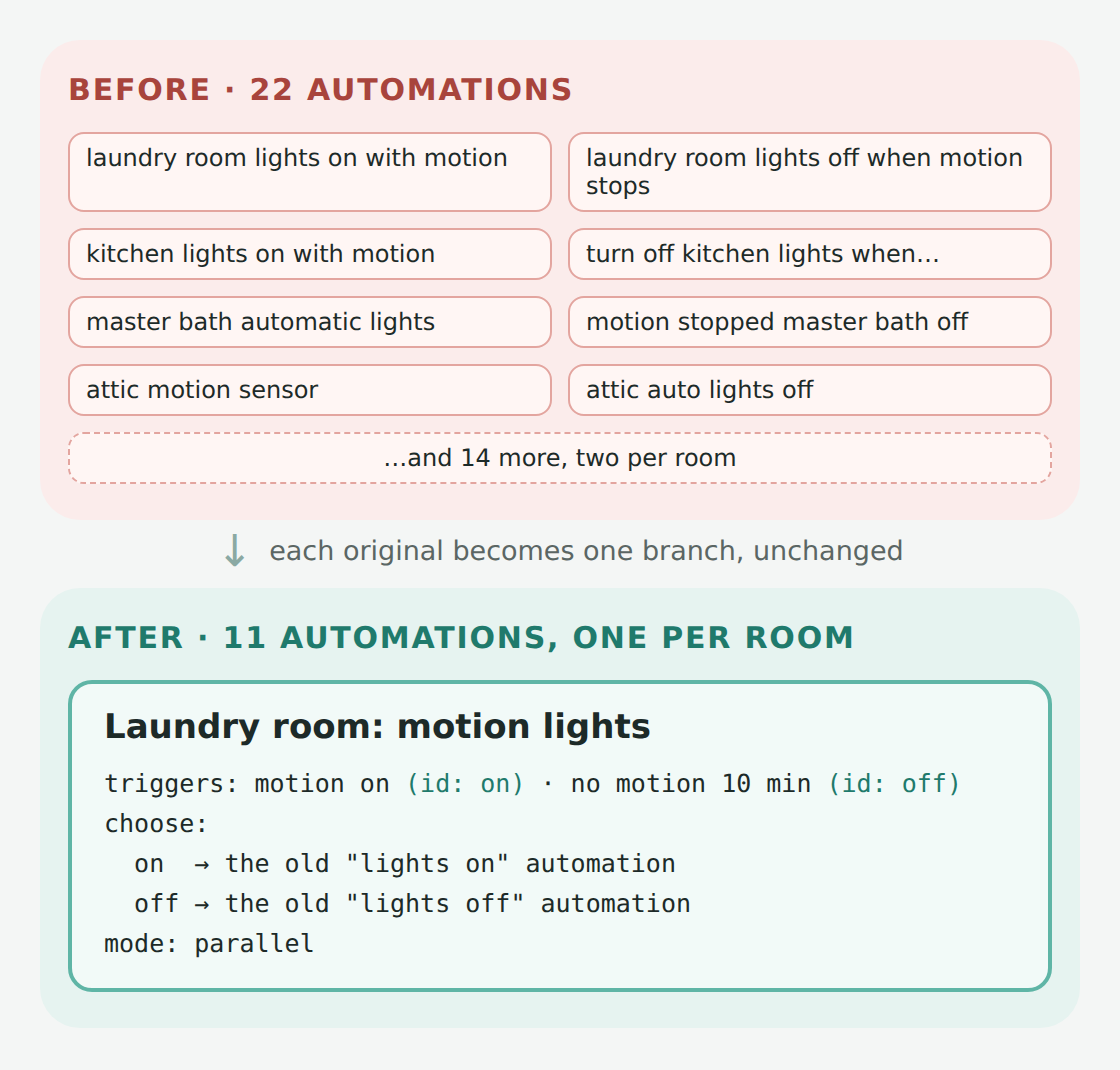 Same logic, half the automations, and each room's motion lights are in one place
delay used as a "hold." Merged into one automation, that hold would have blocked the other branch from running, so they stayed separate. Same for a couple of automations that read their own last_triggered time.Before After How it was checked 9 "light switch control" automations, one per room 1 "Light switch buttons" every switch × every button press, identical light calls 9 front and back door auto-lock automations 2, one per door 40,000 random event sequences, identical lock decisions 22 motion-light automations 11, one per room random motion and light sequences in every room 9 circadian and hallway-dimming automations 3 old vs new, identical calls 14 fan and speaker-volume automations 3 old vs new, identical calls 10 kids' automations (a Mira copy and a Simon copy of each) 5 old vs new, identical calls 8 outdoor light automations 1 schedule each decision tested step by step 7 attic AC automations and 5 basement heater automations 1 each occupancy, manual changes, a late power reading, a missed IR signal 3 TV auto-off automations and 2 TV power watchdogs merged into the new TV setup 3 voice weather automations, 2 "where is Mom/Dad" copies 1 each identical spoken replies to 18 weather questions and 9 "where is" situations The light switches
The attic AC
Voice: Media Controls
Stop Polling Everything
time_pattern trigger: "every 5 seconds, check if the light switch and the bulbs agree, and fix it if they don't." Twenty of them were running every few seconds. One ran every second, all day, forever. Faster, Too
follow_entity). Home Assistant doesn't have to do anything at all for the switch to catch up.recorder_noise.py showed my database was writing about 1.9 million rows a day. About 420,000 of them were CPU and memory readings for every Docker container, which nothing used. Another 212,000 were my mmWave sensors reporting exactly where in the room each person was standing, constantly. Then camera snapshots, signal-strength readings, and calculated humidity averages. None of it changed what's on a dashboard or what an automation does; Home Assistant just stopped saving history nobody looked at, which means less work for the database on every single change. Watchdogs That Back Off
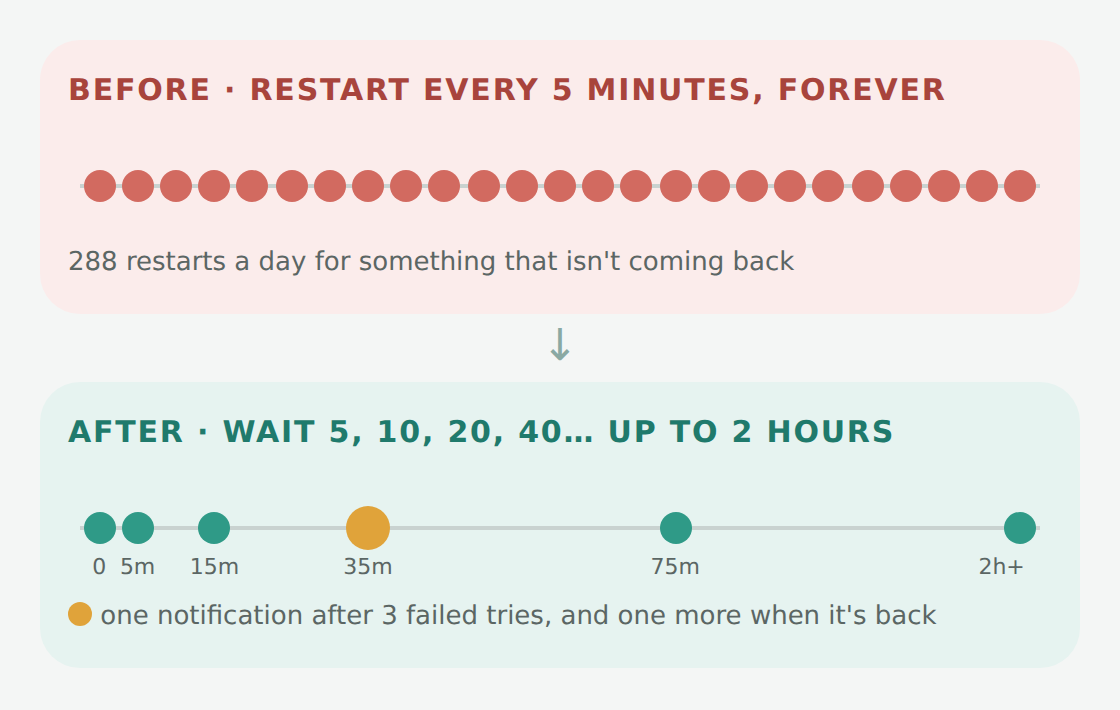 If something isn't coming back, hammering it every five minutes doesn't help
script.watchdog_backoff. It restarts the thing, waits, and doubles the wait each time up to two hours. After three failed attempts it sends me one notification, and one more when it recovers. Each watchdog just hands it the details:- action: script.watchdog_backoff
data:
name: Family room UPS (NUT)
entities:
- sensor.cyberpower1_status
down_states:
- unavailable
restart_action: script.restart_nut
first_wait_minutes: 5 Bugs Hiding in Plain Sight
The weather check that only knew one kind of weather
value_template: "{{ states('weather.home') == ('partlycloudy' or 'sunny' or 'windy') }}"('partlycloudy' or 'sunny' or 'windy') isn't a list: or just returns the first thing that isn't empty, which is 'partlycloudy'. So this only ever matched "partly cloudy." On a sunny morning, the porch lights decided it was gloomy and stayed on. For years. The new version has an actual list of bright conditions, and anything else (except unknown) counts as gloomy. Nest never knew we left
The printer protection that couldn't happen
One space, one silently dead automation
check_config passed, the restart worked fine... and Home Assistant quietly disabled the whole automation with an error in the log.check_config doesn't fail on an invalid automation. It just logs it. So now there's a validate_automations.py that loads every automation and script through Home Assistant's own validator, and nothing gets pushed until that passes. Every automation and script passes it today. Voice Got a Lot Smarter
stop [in] [the] {area}. In a sentence trigger, {area} is a wildcard that matches any words. And since everything in brackets is optional, "stop the timer" matched it, with "timer" as the room. So did "stop the fan." "Volume up" also matched "volume {level}" and set the volume to 50%. Goodbye, 1,082 lines of custom timers
language: en
intents:
  HassStartTimer:
    data:
      - sentences:
          - "set [a|the] {timer_name:name} timer for <timer_duration>"
          - "(set|start) [a] <timer_duration> {timer_name:name} timer"
  HassUnpauseTimer:
    data:
      - sentences:
- "(resume|unpause|continue) [the|my] timer" A Detour: Packages vs. the UI
automations.yaml and into feature "packages" (one YAML file for lighting, one for media, and so on). Very tidy. But automations in packages can't be edited in Home Assistant's UI, and I still like making quick tweaks from my phone.automations.yaml and scripts.yaml stay UI-editable, organized into 19 categories in the UI (Lighting, Climate & Fans, Kids' Bedtime, Voice, and so on). Only the settled, rarely-touched stuff like locks, presence, and the voice PIN lives in packages.triggers:, actions:), and checked that every automation came out identical. That sounds boring, but it matters: when I save an automation in the UI now, Git shows only the lines I actually changed, instead of Home Assistant reformatting the entire file. By the Numbers
automations.yaml and scripts.yaml in the current syntax, which touches nearly every line. Comparing just the first and last versions, 96 files changed: 22,111 lines in, 29,707 lines out. (That doesn't count the wall-tablet dashboards, which have their own post.)Start Now Automations 421 237 Scripts 206 98 Lines of YAML (config and packages) ~32,150 ~21,000 automations.yaml19,197 lines 12,165 scripts.yaml4,892 lines 2,507 Feature packages 2 18 Scheduled automation runs ~389,000 a day ~5,900 Automations polling every few seconds 20 (one every second) 0 History rows written ~1.9 million a day ~1.1 million So, How Was Working With Claude?
What's Left
REVIEW.md: a week of reading the log for warnings, a camera server that keeps dropping its streams, and the basement, which is still being set back up after the flood. (The last once-a-minute checks and the noisy database, which were on this list when I started writing, are done.) But the hard part is done. The config is in Git, every automation passes the validator, and the next time I want to change something, I don't have to be afraid of it.