Goodbye AdGuard Home: Five VLANs, One Technitium DNS Cluster
Table of Contents
Replacing five AdGuard Home instances with two clustered Technitium DNS servers: one DHCP server for every VLAN, separate blocking policies per network, and a few things that didn't work the first time. Part 1 of 2 in Replacing AdGuard Home with Technitium DNS. For years I ran AdGuard Home for DNS, ad blocking and DHCP. With five VLANs, that slowly became five separate instances, each with its own settings, blocklists and DHCP reservations. It worked, mostly. Under heavy use I got dropouts: lookups that stalled and made the whole connection feel unstable. Each VLAN had a single DNS server with no redundancy, so one hiccup hit every device on that network. Every change meant remembering which instance owned what. So I replaced all five with two Technitium DNS servers. This post covers DNS, DHCP and blocking. The next one covers making it survive a Proxmox host failure. I run OPNsense as my router, with one VLAN per part of the house: What I wanted: I created two Debian 13 LXCs running Technitium DNS Server 15.6.2 (2 cores, 2 GB RAM, 16 GB ZFS disk each). CT 701 runs DNS and DHCP; CT 702 runs DNS only. Each container has a virtual NIC on every VLAN bridge, so it serves all five networks directly. Ten IP addresses, but only two DNS servers. The CT 701 config, with addresses and MACs changed for this post: Technitium has built-in DNS clustering, which keeps my 15 local zones in sync between the two servers. Split-horizon behaviour still works, so internal names can resolve differently per network. Clustering is DNS only. CT 702 does not take over DHCP just because it's in the cluster. I wanted Technitium to recurse from the root servers rather than forward to Unbound or a public resolver. An old OPNsense DNS redirect rule got in the way at first; once removed, both servers recursed fine. A quick check, including a DNSSEC-broken domain that should fail: The broken domain returned DNS failures are annoying; DHCP failures make the house seem haunted. I used the exported AdGuard reservations to build Technitium's scopes (105 reservations on the main network alone, and 27 on VLAN10 after I converted eight dynamic leases into reservations). I used 24-hour leases, turned off automatic DNS registration from DHCP, and excluded the DNS servers and old AdGuard hosts from the pools. I migrated one VLAN at a time, disabled DHCP on that VLAN's AdGuard, and confirmed a real renewal on my phone before moving on. The old AdGuard instances stay off as a rollback reference. Never leave two DHCP servers with overlapping pools on the same network. Technitium's Advanced Blocking app was the closest match to what AdGuard was doing. Several VLANs blocked more than ads: social media, shopping, game launchers. I converted AdGuard's simple service rules into plain domain lists: A few complex wildcard rules (like My first idea was to paste all 2,739 domains into Advanced Blocking's JSON. The browser choked, and Technitium answered: The fix: keep the JSON small and serve the bulk lists as plain text files. My main server already runs Docker and Nginx Proxy Manager, so a tiny static nginx container serves the files: Here Two resolver traps cost me time: My laptop and Docker host resolved the list name to a public Cloudflare address and got a 403. To test the local proxy directly, bypass the resolver: CT 702 still used OPNsense as its own Linux resolver, so Advanced Blocking group names are arbitrary, so I made That's an excerpt, not the whole config. I connect back home over WireGuard (tunnel range Instead I gave each VPN client a stable tunnel IP and mapped specific clients to a group: unlisted ones get VLAN10 filtering, one gets unfiltered VLAN20, one gets VLAN0, and a few get the kids' policy. Less clever, more reliable. It depends on Technitium seeing the real tunnel IP, so if OPNsense source-NATs VPN traffic this won't work; check the client IP in the query log. From a VLAN10 client, both servers returned That proves the source-IP policy and the locally hosted list are both working. Five AdGuard instances are now two Technitium servers with one DHCP configuration, per-VLAN filtering, and individual rules for the kids' iPads and VPN devices. DNS is redundant. DHCP is not: it lives only on CT 701, so if its Proxmox host dies, nothing hands out new leases. Fixing that is the next post. Next in this series: Making Technitium DNS Survive a Proxmox Host Failure The Old Setup
Network Old AdGuard Purpose VLAN0 192.168.10.2Main network VLAN10 192.168.11.2Personal devices VLAN20 192.168.12.2Essentially unfiltered VLAN30 192.168.13.2Guest network: light ad blocking, clients isolated from each other, home of the kids' iPads VLAN40 192.168.14.2My "Google network": big-tech devices that talk to their cloud services 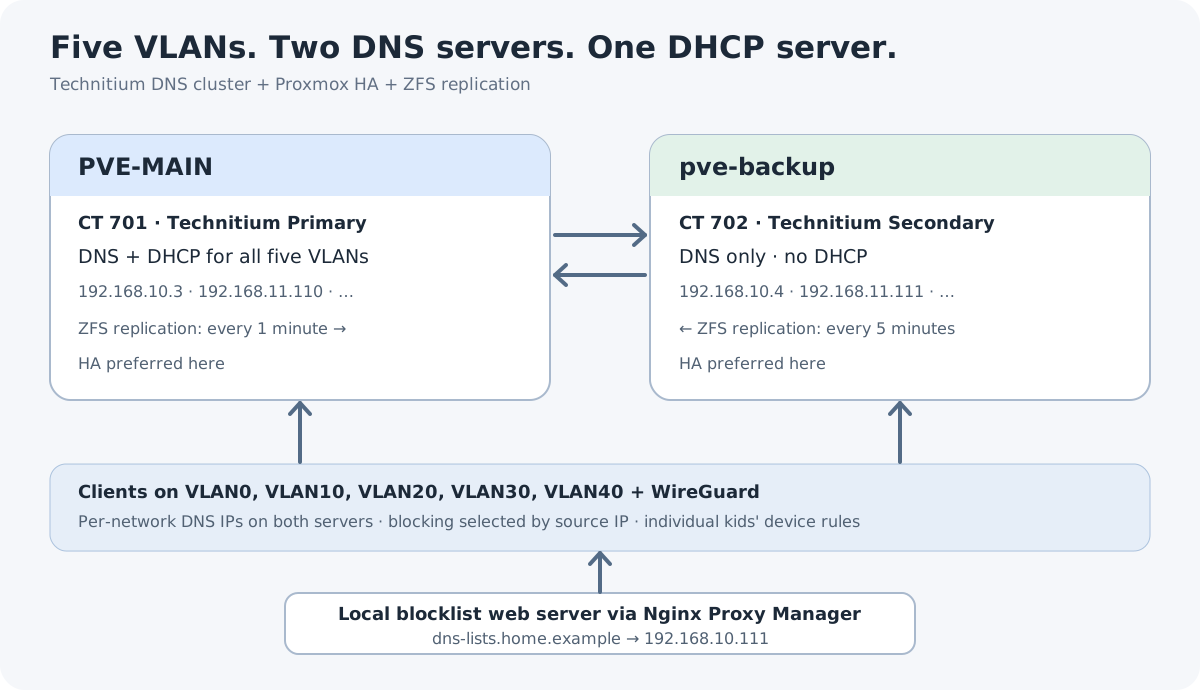 Two DNS servers, one DHCP server, five VLANs
 Two Containers, Ten Addresses
Network CT 701 CT 702 VLAN0 192.168.10.3192.168.10.4VLAN10 192.168.11.110192.168.11.111VLAN20 192.168.12.110192.168.12.111VLAN30 192.168.13.110192.168.13.111VLAN40 192.168.14.110192.168.14.111hostname: technitium-1
cores: 2
memory: 2048
nameserver: 192.168.10.3
net0: name=eth0,bridge=vmbr0,gw=192.168.10.1,hwaddr=02:5A:C3:11:70:01,ip=192.168.10.3/24,type=veth
net1: name=eth1,bridge=vmbr10,hwaddr=02:5A:C3:11:70:02,ip=192.168.11.110/24,type=veth
net2: name=eth2,bridge=vmbr20,hwaddr=02:5A:C3:11:70:03,ip=192.168.12.110/24,type=veth
net3: name=eth3,bridge=vmbr30,hwaddr=02:5A:C3:11:70:04,ip=192.168.13.110/24,type=veth
net4: name=eth4,bridge=vmbr40,hwaddr=02:5A:C3:11:70:05,ip=192.168.14.110/24,type=veth
rootfs: local-zfs:subvol-701-disk-0,size=16G Clustering and Recursion
dig @192.168.10.3 example.com A +short
dig @192.168.10.4 example.com A +short
dig @192.168.10.3 dnssec-failed.org A +noall +commentsSERVFAIL, as it should. Moving DHCP
Network DHCP pool Gateway DNS handed to clients VLAN0 .30–254.1.3, .4VLAN10 .2–254.1.110, .111VLAN20 .3–100.1.110, .111VLAN30 .3–100.1.110, .111VLAN40 .3–100.1.110, .111 Rebuilding the Blocking Policies
Policy Domains VLAN0 719 VLAN10 799 VLAN40 1,221 Kids' iPads 748 denyallow) can't be flattened into a hosts list faithfully, so I set those aside for review instead of guessing. The Paste That Timed Out
Reading the request body timed out due to data arriving too slowly.
See MinRequestBodyDataRate. Hosting the Lists
services:
  technitium-lists:
    image: nginx:stable-alpine
    container_name: technitium-lists
    restart: unless-stopped
    volumes:
      - /opt/technitium-lists/lists:/usr/share/nginx/html:ro
      - /opt/technitium-lists/nginx.conf:/etc/nginx/conf.d/default.conf:ro
    networks:
      - proxy

networks:
  proxy:
external: trueproxy is the existing Docker network Nginx Proxy Manager is on. NPM publishes the lists at https://dns-lists.home.example/ with a valid certificate, and both Technitium servers have an internal record pointing that name at the proxy (192.168.10.111).curl --noproxy '*' \
--resolve dns-lists.home.example:443:192.168.10.111 \
https://dns-lists.home.example/vlan10.txt | wc -lcurl inside the LXC resolved the name wrongly even though Technitium itself was right. Setting its Proxmox nameserver to 192.168.10.4 fixed it. One Policy Per Network
vlan0 to vlan40, kids-ipads and default, and mapped source networks to them. A single device gets its own policy just by having a stable IP, because host entries are more specific than subnets:{
"networkGroupMap": {
"192.168.10.0/24": "vlan0",
"192.168.11.0/24": "vlan10",
"192.168.12.0/24": "vlan20",
"192.168.13.0/24": "vlan30",
"192.168.14.0/24": "vlan40",
"192.168.13.65": "kids-ipads",
"192.168.13.66": "kids-ipads",
"172.20.8.0/24": "vlan10",
"0.0.0.0/0": "default",
"[::]/0": "default"
}
}vlan20 and default have blocking off. kids-ipads uses the standard VLAN30 ad-block lists plus its own service list:{
"name": "kids-ipads",
"enableBlocking": true,
"blockAsNxDomain": true,
"blockListUrls": ["https://dns-lists.home.example/kids-ipads.txt"],
"adblockListUrls": [
"https://adguardteam.github.io/HostlistsRegistry/assets/filter_1.txt",
"https://adguardteam.github.io/HostlistsRegistry/assets/filter_2.txt"
]
} WireGuard Complication
172.20.8.0/24). I first wanted the VPN client's choice of DNS address to pick its filtering policy. But Advanced Blocking can match either the destination address or the source subnet, not "source is WireGuard, then pick by destination." The workarounds (NAT, IP aliases, patching the app) were too much work. Checking Which Policy Matched
dig shows not only that a domain is blocked, but which group and list blocked it:dig @192.168.10.3 snapchat.com A +noall +commentsNXDOMAIN with an extended DNS error:EDE: 15 (Blocked):
(source=advanced-blocking-app;
group=vlan10;
blockListUrl=https://dns-lists.home.example/vlan10.txt;
domain=snapchat.com) Where This Leaves Things