Making an Automatic Email Backup (2026): One Repo, Better Search
Table of Contents
Five years in, my self-hosted email archive gets cleaned up: four repos become one, Solr is replaced by Dovecot's built-in search, All Mail and Flagged folders finally work, and certificate renewals stop needing a manual restart. Part 5 of 5 in Making an Automatic Email Backup. I have been running this email setup for about five years now. Every email from my Fastmail account gets copied to my home server, Dovecot serves that copy back to me over IMAP, and my iPhone connects to it over a WireGuard split tunnel wherever I am. It has been remarkably stable. It also means I own a copy of every email I have ever received, and I can keep the mailbox at my provider trimmed without losing anything. In 2024 I added Solr so that searching from my phone didn't take forever. Since then I had kept tweaking things on my server, and at some point I realized I no longer knew what I was actually running. The code was spread across four GitHub repos (dovecot, mbsync, solr, and an example compose file tying them together), and none of them matched my server. The running containers were the only real source of truth. So, like I did with my Home Assistant setup, I sat down with Claude and cleaned it up. I pulled the config files out of the running containers, Claude compared them with the repos and my old posts, and we rebuilt the whole thing as one repo: mailstack. Claude did the reading, writing and testing. I answered questions and made the decisions. In retrospect, my amateur attempt at building this was successful, but it wasn't as clean as I had thought. This was the biggest change, and honestly the one I didn't see coming. I added Solr in 2024 because I assumed it was the only option. Without some kind of index, Dovecot really does read every message one by one for each search, and with a few hundred thousand emails that is painfully slow. It turns out Dovecot now has a search index built in, called flatcurve. It keeps its index right next to the mail, so there's no separate Java service to run. Tika is still there to read attachments. I didn't want to swap it in on faith, so Claude generated a test archive of 50,000 emails (made from public-domain books, with a few words planted on purpose) and ran the same searches against both. The first row is the one I care about most. As you type, the iPhone's Mail app only searches the mail that's already on the phone. When that doesn't turn up what I want, I hit Search and it asks the server to search the whole archive, sending whatever is in the box at that moment. Solr only matches whole words, so a partial word like "invo", or the first half of someone's name, came back empty. Flatcurve matches the start of words, so the server now finds "invoice" from "invo", much like the phone's own search does. Solr isn't bad at this. Its index is a fraction of the size, it builds that index faster, and searches were just as quick with either one. So why switch? The price is disk space. My Solr index is 2.75 GB, and going by the test I expect flatcurve's to land somewhere around 13 GB, so roughly 10 GB more once Solr is gone. On a server with room to spare, that's an easy trade for less complexity, less memory and better partial matches. If your disk is tight, Solr is still a perfectly good choice. Two smaller notes: Since those folders never existed, we built them properly. They're Dovecot "virtual" folders: live views over the real folders, so nothing is copied. The Spam and Archive folders are now labelled properly too, so the iPhone knows which folder is which when I archive something or mark it as junk. This one fixed an annoyance I had stopped even thinking about. My certificate is a wildcard certificate that Traefik gets for my domain. A job pulls it out of Traefik every night, and Syncthing copies it to every machine that needs it, including the mail server. Two things went wrong regularly. Dovecot only reads its certificate when it starts, so after a renewal it kept serving the old one until I restarted it by hand. And because the old startup script ran Now the folder is mounted read-only, so nothing ever touches it, and Dovecot checks every five minutes whether the files changed. When they have, and the new certificate actually matches the key (so a half-synced file can't break anything), it reloads itself. I wanted to mention this because I asked about it myself. The iPhone's Mail app only does true background push for iCloud, Exchange and a few big providers, not for a self-hosted IMAP server like this one. With Mail open, new mail shows up instantly. Otherwise the phone checks on the schedule under Settings → Apps → Mail → Mail Accounts → Fetch New Data. There's no good way around that, so the best I can do is keep the sync interval short. The nice part is that your mail folder doesn't change. Message numbers and read/flagged states carry over, so mail apps don't re-download anything, and mbsync picks up exactly where the old container left off. The settings have new names, though, so it's a one-time edit: If you run your stacks through Portainer like I do, the settings go in the stack's Environment variables section instead of a The migration guide has a table mapping every old setting to its new name, and how to go back if you need to. The search index gets built once in the background after the switch. It took the test archive under a minute, and a big archive with lots of attachments can take an hour or more. Mail works normally in the meantime. The old I switched my own server over the morning I finished this post. It's working, but not before I tripped over my own feet a couple of times. Nothing re-downloaded. mbsync's first run went through all 42 of my folders and came back with I filled in the settings wrong. I had loaded the example values into Portainer and only edited some of them, so Dovecot started up with the placeholder username "me", and somehow my real username had ended up in the password field. Living up to the name of this blog. Two small papercuts got fixed along the way. My old setup took the certificate as just My iPhone said the server wasn't responding. This was the interesting one. The logs showed the phone logging in fine, turning on IMAP compression, and hanging up a few milliseconds later: My old Dovecot never offered compression; the new one does by default. Switching it off fixed my phone immediately. It's now off in the images, with a test so it can't sneak back in. On a home network or a VPN, compression barely saves anything anyway. mbsync prints The search index builds in the background. About 430 MB so far after the first big folder, and still going as I write this. Mail worked normally the whole time. Five years ago this started as an LXC, a couple of config files and a lot of trial and error. It turned into four Docker images that mostly worked, and now it's one repo I actually understand again, with better search than before and one less service to run. If you're running the old images, I'd love to hear how the move goes. And as always, let me know if you have any questions or if I got something wrong. Thanks for reading! That is the end of the series. Previously: Making an Automatic Email Backup (Updated 9/15/2024)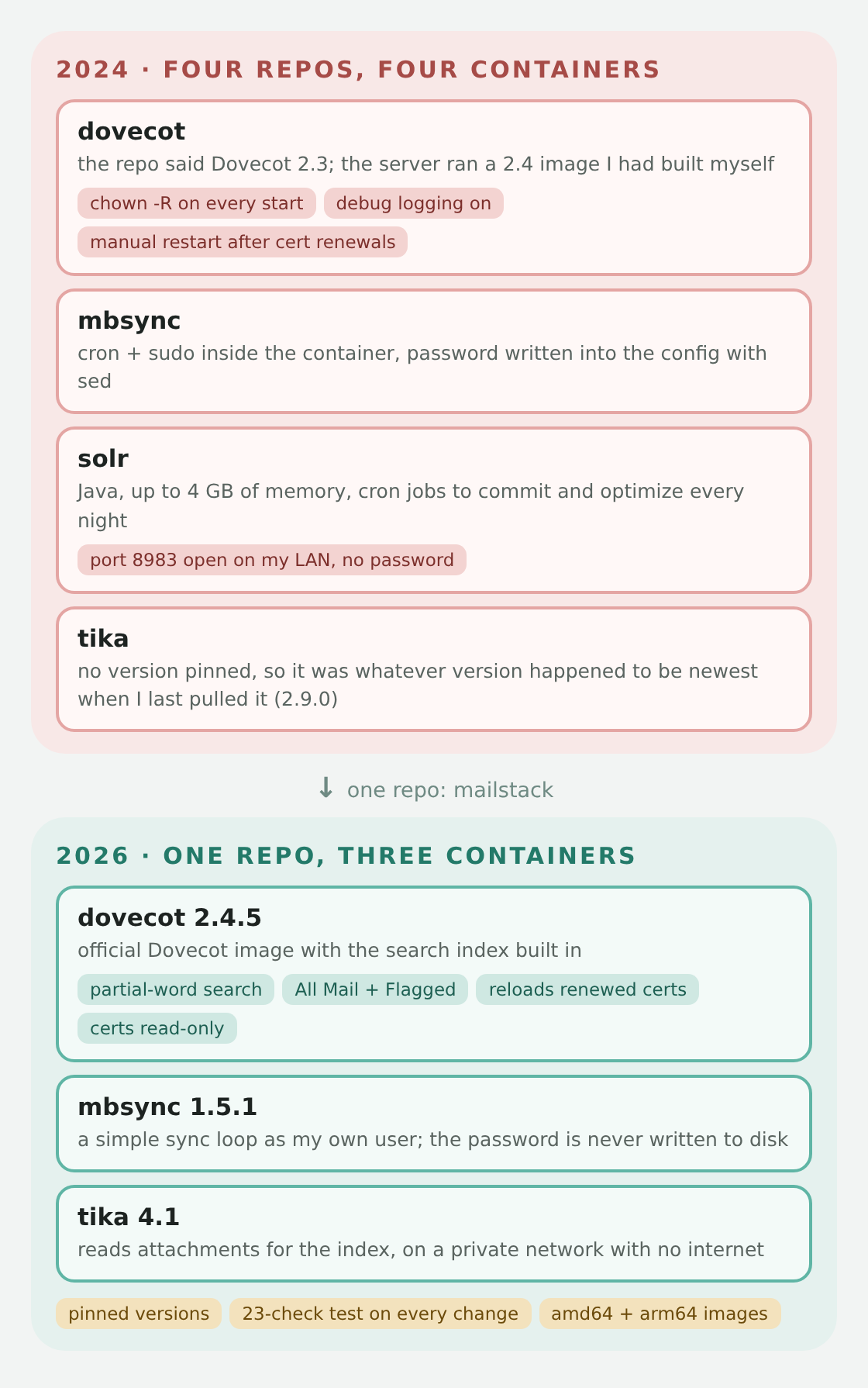 Then and now
 What We Found
2.4.1-beta-3, which wasn't in any repo.chown and chmod on my entire mail archive and on my certificate folder. More on why that mattered below. Search: Goodbye Solr
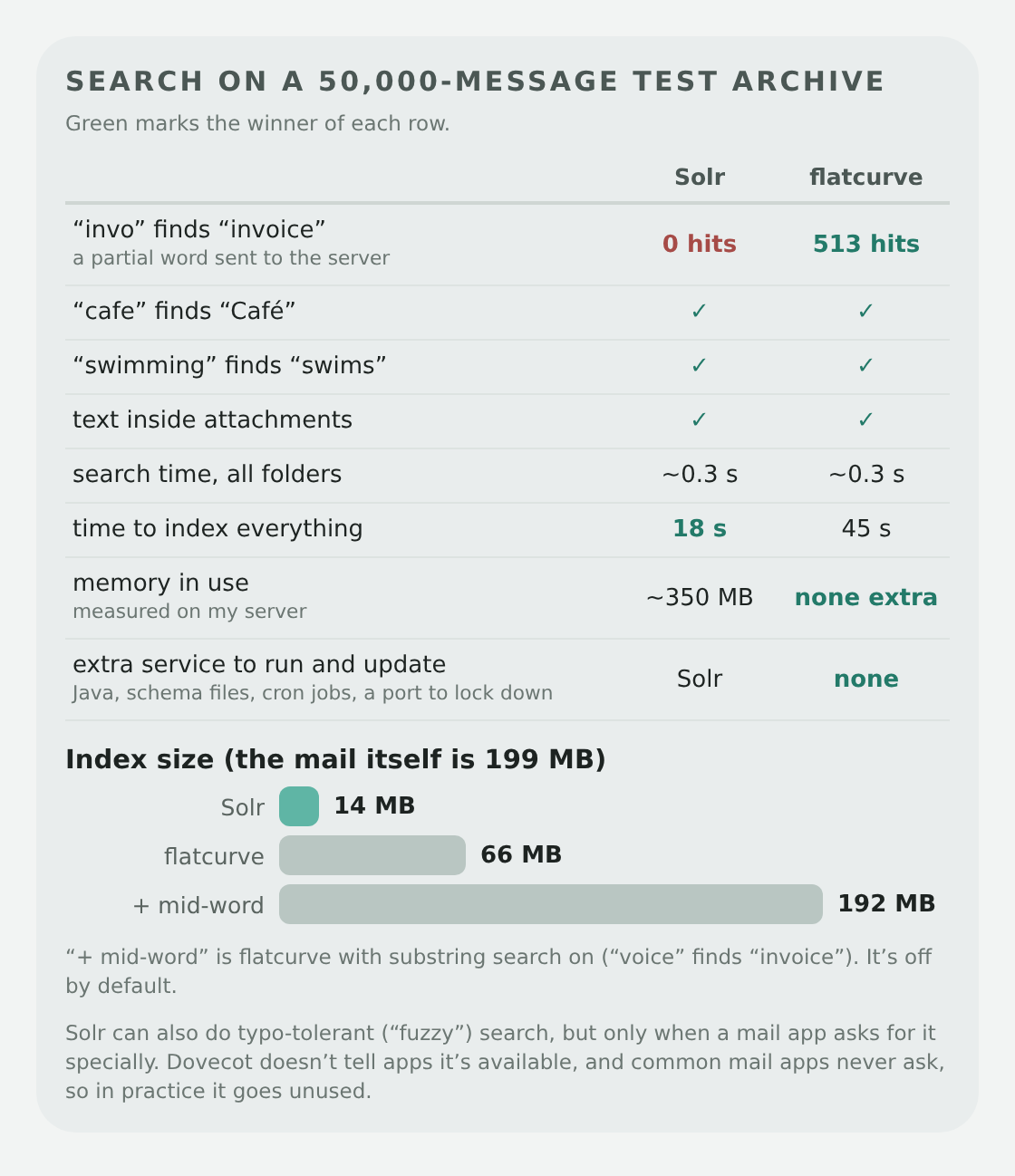 Same searches, same test archive. Green marks the winner of each row
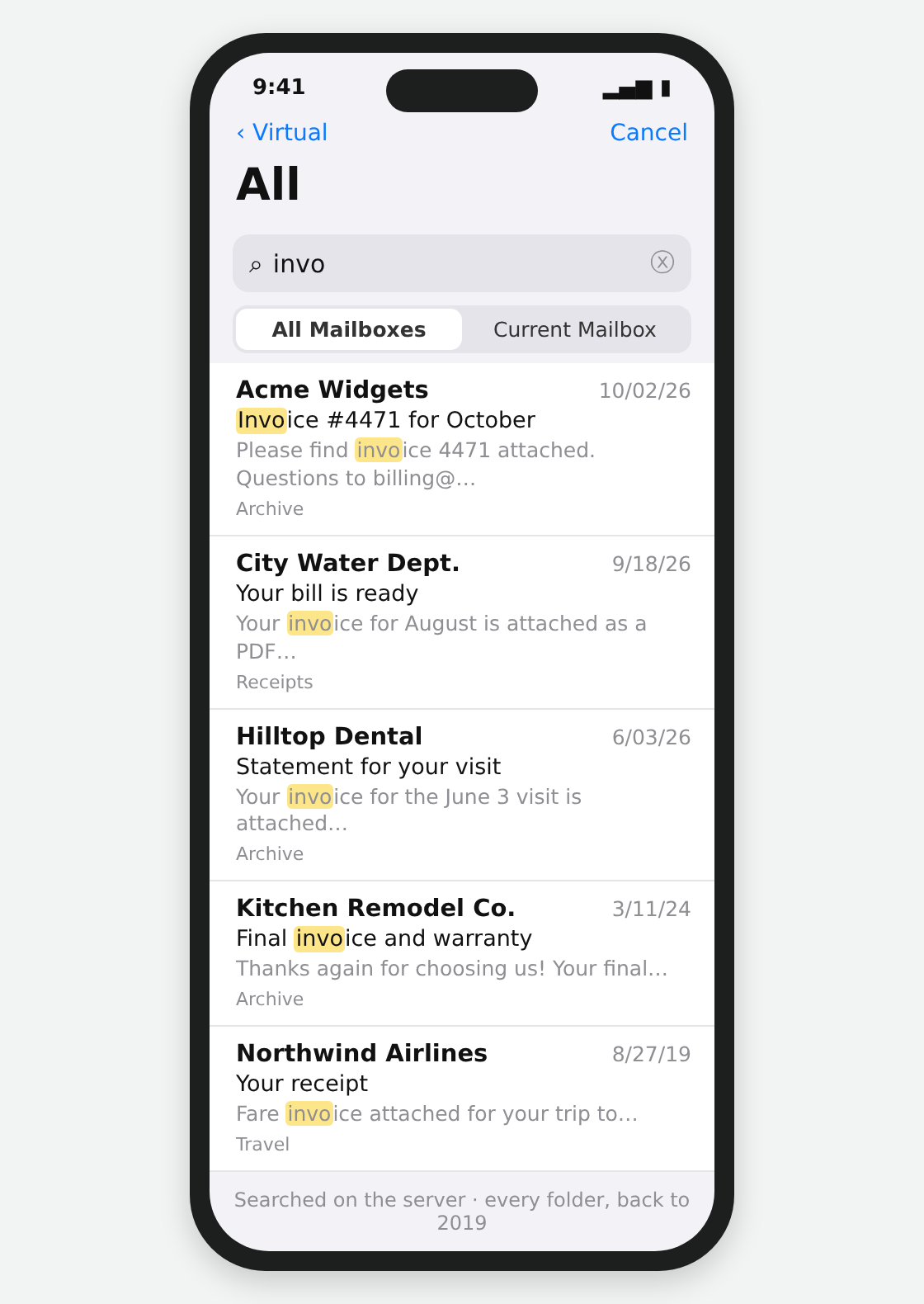 A mock-up with made-up mail (not my inbox), but this is the idea: a partial word sent to the server now finds things
 Why flatcurve anyway
All Mail and Flagged, For Real This Time
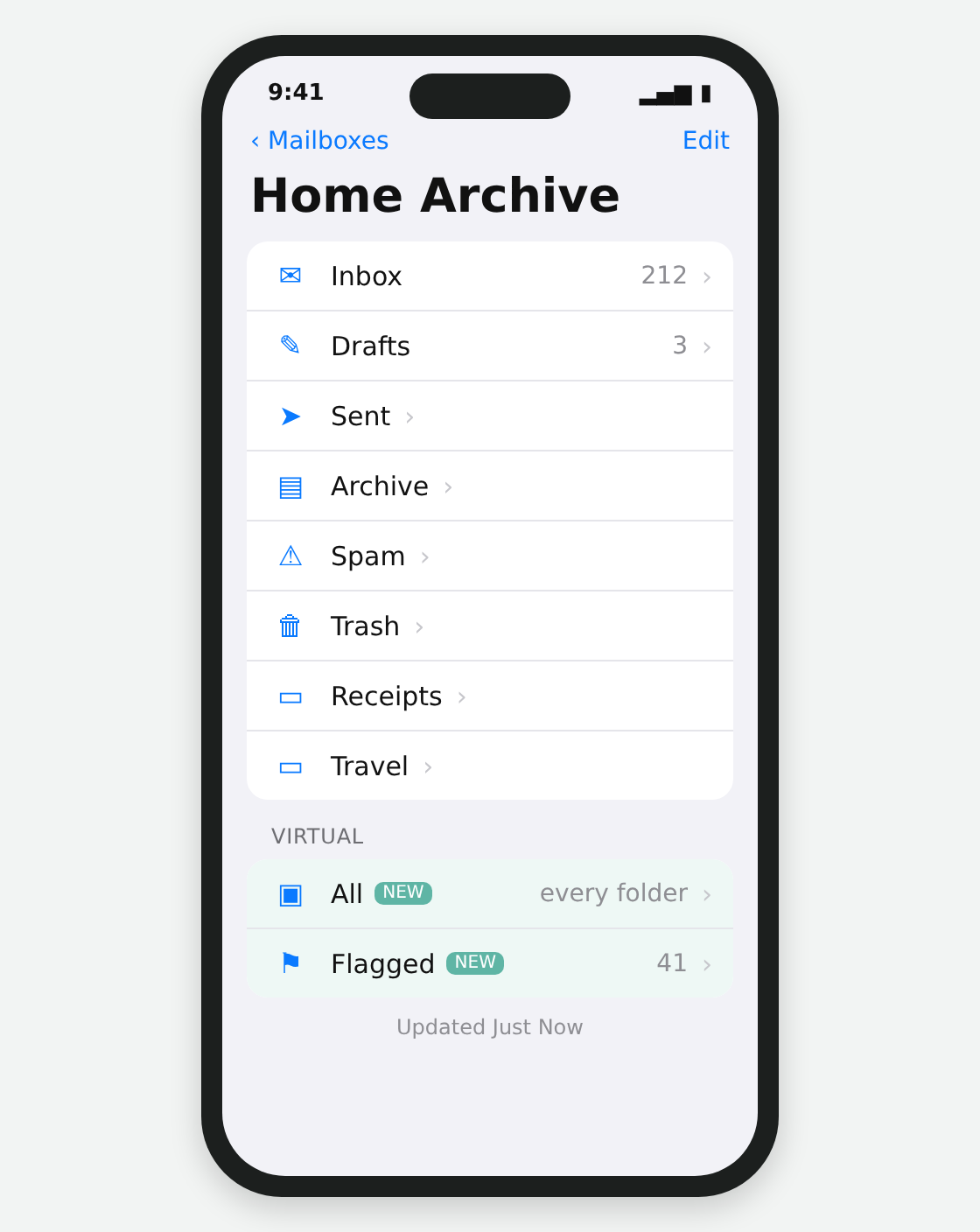 Another mock-up: the two new folders show up under Virtual
 Certificates That Renew Themselves
chown and chmod on the certificate folder every time, Syncthing saw "changes" it didn't make and got confused about permissions. I would clear the errors and it would fix itself, but it was always something.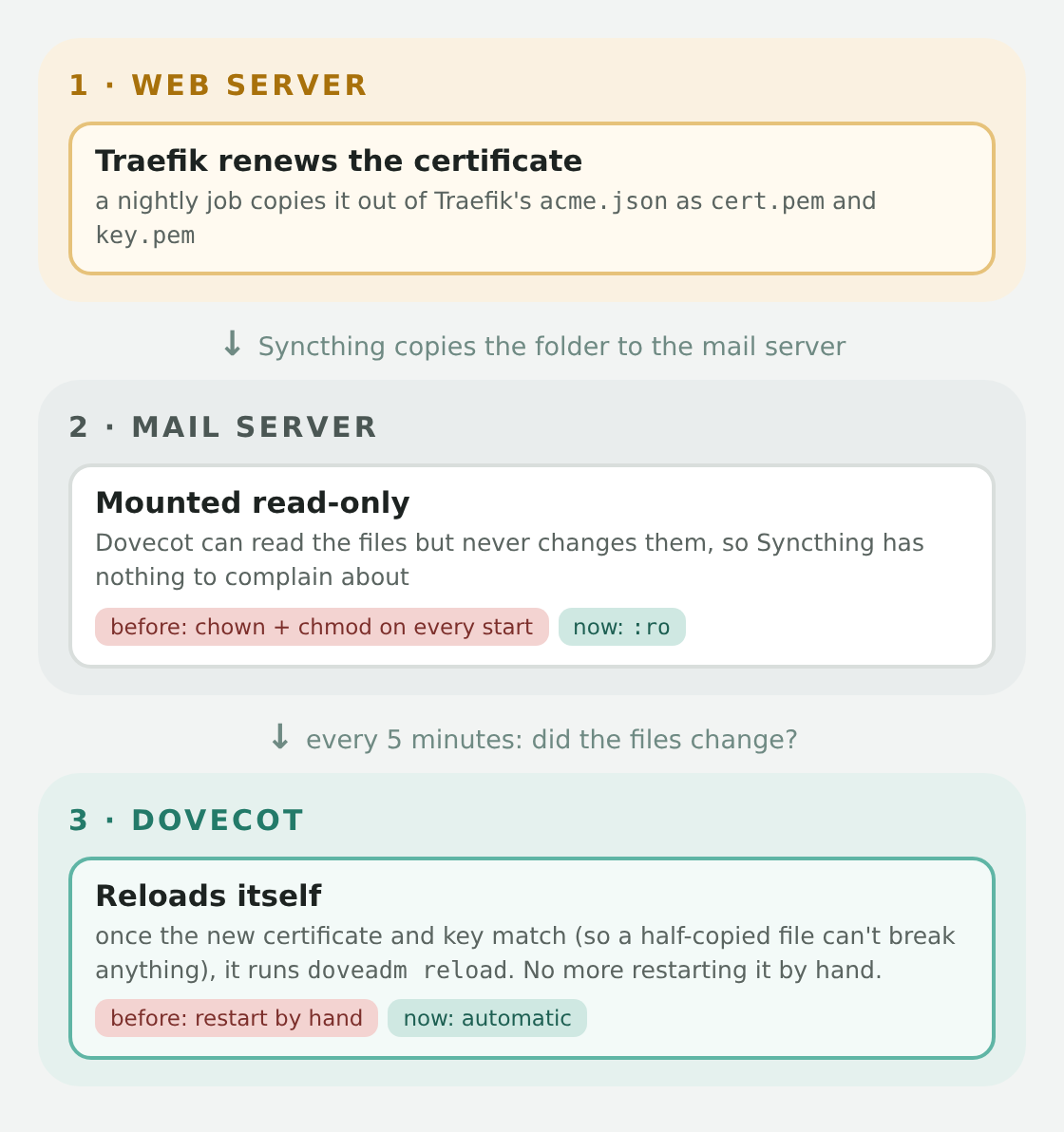 No more restarting Dovecot after a renewal
 Smaller Things That Add Up
sed (which could also break on passwords containing certain characters). Now mbsync asks for the password only when it logs in, and both passwords can come from Docker secret files if you don't want them in environment variables. What About Push?
Switching Over
mkdir -p ~/mailstack && cd ~/mailstack
curl -fsSLO https://raw.githubusercontent.com/jon6fingrs/mailstack/main/compose.yaml
curl -fsSL -o .env https://raw.githubusercontent.com/jon6fingrs/mailstack/main/.env.example
nano .env                  # fill in your settings
docker compose up -d.env file, and the compose file doesn't need any changes.thehelpfulidiot/dovecot, mbsync and solr images stay on Docker Hub so nothing breaks for anyone using them, but they won't be updated. How My Switch Went
Near: +0, meaning there was nothing new to copy. It picked up exactly where the old container left off, and a few minutes later it pulled down one new email, which is the whole job.cert.pem. The new one wanted /ssl/cert.pem and refused to start without it; it now accepts either. And when mbsync couldn't write to my mail folder (my files still belong to the user ID from my old Synology days), its error message only said that. Now it tells you exactly which PUID and PGID to set.imap-login: Info: Logged in: user=<…>, method=PLAIN, TLS
imap: Info: Disconnected: Connection closed (COMPRESS finished 0.004 secs ago)Maildir warning: ignoring INBOX in /mail/ on every run. That's harmless. It's about how my INBOX folder sits inside the mail folder, INBOX still syncs, and the old container printed it too, just where I never looked. Closing