Moving Four Websites Off My Home Server and Onto Cloudflare Pages
Table of Contents
How I moved four self-hosted websites from a home server behind an Oracle VPS to Cloudflare Pages, using GitHub Actions for the two Zola sites and Cloudflare's own Git integration for the two plain HTML sites, plus what bit me along the way. Part 2 of 2 in From WordPress to Static Hosting. A few weeks ago I moved this blog from WordPress to Zola. That left me with a pile of static files, which raised an uncomfortable question: why was I serving them from a server in my house? WordPress needs PHP and a database, so a free host is hard to find. Static files can live almost anywhere. So I moved four sites to Cloudflare Pages: this blog, my personal site, and two small calculators. The setup was the one from Create a FREE public endpoint for self-hosted services using Oracle Cloud and OPNsense. A free Oracle VPS held the public IP, and a WireGuard tunnel carried traffic to my house. It mostly worked, but the connection was often unstable. Pages needed several reloads, and it got worse when more than one person visited at once. With that many hops I could never tell which one was at fault. My DNS already lived there, and Pages is a free static host. Moving a site meant pointing the name somewhere else. Now the sites don't depend on my house having power. These need a build, so GitHub Actions does it. On every push to the main branch it builds the site, runs the link check and the site's tests, and only if all of that passes uploads the result with The deploy uploads the exact folder the tests ran against, and I pinned the wrangler version so an update can't change my deploys. Setup was a Cloudflare API token with one permission (Cloudflare Pages: Edit) plus my account ID, both stored as GitHub secrets. The workflow skips the deploy if they're missing, so I could merge it before Cloudflare was ready. Each calculator is one No CI, no secrets, no token to rotate. The cost is that there's no gate either: whatever lands on the branch is published. And as far as I can tell, a Pages project is either Git-connected or direct-upload, with no switching later, so decide before you create it. Functions are small JavaScript files that only run on the paths listed in Since the DNS was already in Cloudflare, cutover was adding the domain under Custom domains in the Pages project. Cloudflare handled the DNS record and certificate. I left the mail records alone. Beforehand I compared each site on its Most of these fail silently. Yes. As with the WordPress move, I leaned heavily on Claude for the workflow, Functions and tests, and I made the decisions and ran the deploys. Publishing is now a Thanks for reading. That is the end of the series. Previously: Goodbye WordPress, Hello Zola Where things were
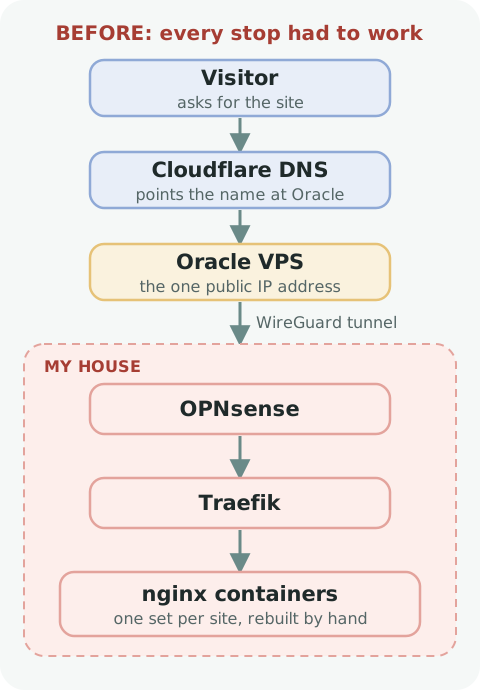 The old path. Every stop had to work.
 Why Cloudflare
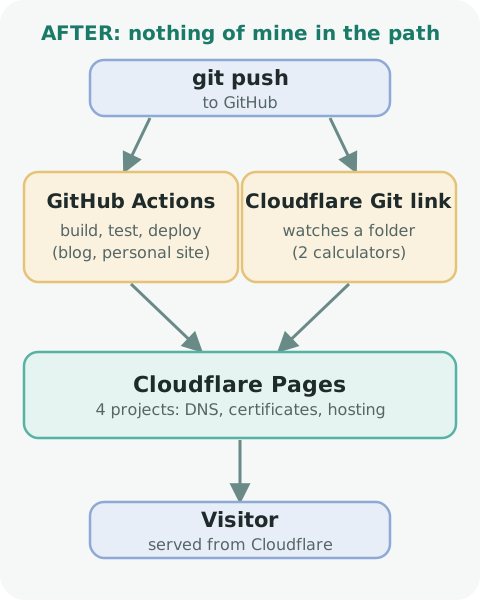 The new path
 Two ways onto Pages
The Zola sites: GitHub Actions
wrangler pages deploy. A red check never deploys.deploy:
needs: build
if: github.event_name == 'push' && github.ref == 'refs/heads/main'
env:
CLOUDFLARE_API_TOKEN: ${{ secrets.CLOUDFLARE_API_TOKEN }}
CLOUDFLARE_ACCOUNT_ID: ${{ secrets.CLOUDFLARE_ACCOUNT_ID }}
steps:
# ...download the built site, then:
- run: npx --yes wrangler@4.156.0 pages deploy --branch main --commit-hash "$GITHUB_SHA" The calculators: Cloudflare watches the repo
index.html, so there's nothing to build and a workflow would only copy a file. Instead, Cloudflare Pages connects to the GitHub repo directly. Both calculators live in one repo, so I made two Pages projects, each watching its own folder with no build command:ophtho-sites/
├── munnerlyn/
│ ├── index.html
│ ├── 404.html
│ └── _headers
└── randleman/
└── (same) What nginx used to do
Old job New home Redirects ( /feed to /rss.xml)_redirectsCache and security headers _headers410 Gone for WordPress leftovers like /wp-login.phpFunctions Self-hosted Plausible analytics proxy Functions Contact form on my personal site A Function that sends through Fastmail A real 404 page 404.html_routes.json. Forget to list one and it just never runs, with no error. The contact form's password lives in Cloudflare secrets, and secrets only take effect on the next deploy, so I had to re-run the workflow before the form worked. Cutover
pages.dev address against the live one, and for the blog I used a script that checks every sitemap URL, every asset and the old WordPress addresses. Lessons learned
/x and /x/ are different paths. nginx can cover both in one rule. In _redirects, list each.Cache-Control rules gets both, joined. Make sure each path matches one.404.html means every unknown URL returns index.html with a 200. Adding one brought real 404s back.pages.dev copies, or Google may index them as duplicates. A _headers rule for those hostnames fixes it.pages.dev copy. Left in place after cutover, the live site would have linked to the wrong place._routes.json drift apart catches it in CI instead of as a 404. Was it worth it?
git push for the calculators and a merged pull request for the blog, and a failed build leaves the old site up. No home server, tunnel or Oracle VPS is in the path anymore.