Tuning My Home Assistant Automations on Real Data Instead of Guessing
Table of Contents
My bathroom fan kept starting when nobody was showering, and my bedroom night mode kept switching itself off at 2 am. I stopped guessing, exported Home Assistant's history and replayed it against the rules, with Claude writing the replay scripts. Here's how that works and what the numbers said. For years my way of tuning an automation was: change a number, wait a few days, get annoyed, change it again. It works, but slowly, and you only learn about a mistake when someone in the house is standing in a cold bathroom or a dark bedroom. This month I did it differently on two things that had been bugging me, the fan in the master bathroom and the "night mode" for our bedroom. Before I changed anything, I exported what the sensors had actually done over the last ten days and ran the old rule and the new rule over the same events. Then I looked at the numbers. It's not fancy. It's a pile of small Python scripts. But it changed how I make decisions about the house, and it's a good job for an AI to do, so this is how it went. The master bath has a fan on the same circuit as the shower spotlight. I wanted it to start by itself when someone showers and keep running until the steam is gone, so nobody has to remember. My first attempt at a smarter fan leaned on one humidity sensor and started the fan when it rose. It mostly worked. It also: That limit is there for a reason. The bathroom shares a wall with one of the kids' bedrooms, and I don't want a fan roaring next to a sound machine all night. I could have kept nudging the threshold. Instead I asked Claude to help me look at the data first. Home Assistant keeps ten days of history by default. A small read-only script, (My real command lists a lot more than that, and those are not my real entity names.) It changes nothing. It's just a copy of what happened. Then comes the part I'd never have bothered with alone: a replay. A second script walks through the export on a clock it controls and says what a rule would have done at each moment. Run the old rule and the new rule over the same ten days and you can compare them without anybody having to take a shower on purpose. Claude wrote these scripts and I read what came out. Questions like "what happened with the shower on the 5th?" turn into a lookup instead of a guess, because the answer is already in the export. The export made something easy to see that I'd missed living with these sensors. There are two humidity sensors in the bathroom, and they behave very differently: So the Zigbee sensor is useless for catching a shower early, but its silence is a great clue. The Athom starting to climb while the Zigbee sensor has gone quiet is a shower. The Athom climbing while the Zigbee sensor is still chatting along is someone at the sink. The new rule is: "Half" isn't magic. It's where the recorded showers said the steam was effectively gone. I replayed September 30 to October 10: 84 bathroom visits, 30 of which had a shower. Two of the 84 visits were unclear: you can't tell from the sensors whether somebody showered. The older triggers start the fan for both of them either way, so they don't change the comparison. Not everything came from the numbers. At one point the main light going off stopped turning the fan off during a "clearing" run. I only found out because I noticed the fan was still going, and no replay would have told me, because that's a habit, not a sensor. It's fixed: turning the light off ends the run again, because that's how the family has always used it. The second thing was "night mode" for our bedroom. It's what tells the house we're settled in for the night. The bedroom motion lights, for one, stay off while it's on. It doesn't literally mean asleep. Getting ready for bed and a bathroom trip count. My first version used a Bayesian sensor, one of Home Assistant's built-in helpers. Each "clue" gets two numbers: how likely is this clue if it's night mode, and how likely is it if it isn't. The sensor multiplies them all together and turns on when the answer is over a threshold. Mine had five clues: I didn't pick those numbers. A second replay script, (One number is deliberately not what the data said: the time-of-day clue learned 0.98, but I capped it at 0.85, so a nap at 2 pm can still count.) That's the "lights out with someone in the room" clue. Notice the three-minute grace period. It's there because the presence sensor drops out for seconds to minutes while we're asleep. On October 22 it did that six times, the longest for 2 minutes 35 seconds. The first version turned on within a minute of lights-out every night, which was great. But it turned off whenever the presence sensor blinked or a light came on. In the three nights I could compare (October 21 to 24), it went off 8 times before the last of us was up, for anywhere from 8 seconds to 16 minutes. Then it came back on 3 times after the morning was over. Which is when I stopped trying to make the clues smarter and wrote down what I actually want: On when the first person goes to bed, off when the last person wakes up or leaves. That isn't a probability. It's a latch. The clues decide when it turns on; after that, only one thing can turn it off: the whole suite (bedroom plus attached bath) being empty for 5 minutes. And between 9 pm and 5 am, an empty suite doesn't count, it waits until 5. A third rule keeps it from restarting before 10 am once the morning has ended. I replayed the latch over October 14 to 24: one on and one off every night. On between 9:01 and 10:29 pm, off between 6:17 and 9:09 am, always five minutes after the last of us left. It was wrong once in the daytime: a Wednesday evening when someone lay down in the bedroom with the door closed. It cleared itself when the suite emptied. One more story. On October 23 night mode switched on at 7:21 am. That's not bedtime. What happened: the bedroom's motion lights had turned themselves off after the room emptied, and "lights off with someone in the room" is one of the clues. Night mode started, and then it kept the lights from coming back on for me while I was in the bath. The fix was to give the clue a memory of who turned the lights off (a small I've written before about cleaning up my whole Home Assistant setup with Claude, and this was the same arrangement on a smaller scale. Claude did: I did: Honestly, the replay scripts are the part I'll keep. I used to be afraid to touch the fan because every change was a few days of "did that help?" Now I change the rule, run the replay, and know in a minute. You don't need any of my scripts. The recipe is short: My scripts live in the same repo as my config. If a future automation breaks, the replay is the first place I'll look. The Fan That Started for No Reason
Ten Days of Everything
export_history.py, asks for every state change of just the entities I name and writes them to a compressed file:docker exec homeassistant python3 /config/scripts/export_history.py --days 10 \
--out /config/history-export.json.gz \
sensor.athom_humidity sensor.shower_zigbee_humidity light.master_bath ...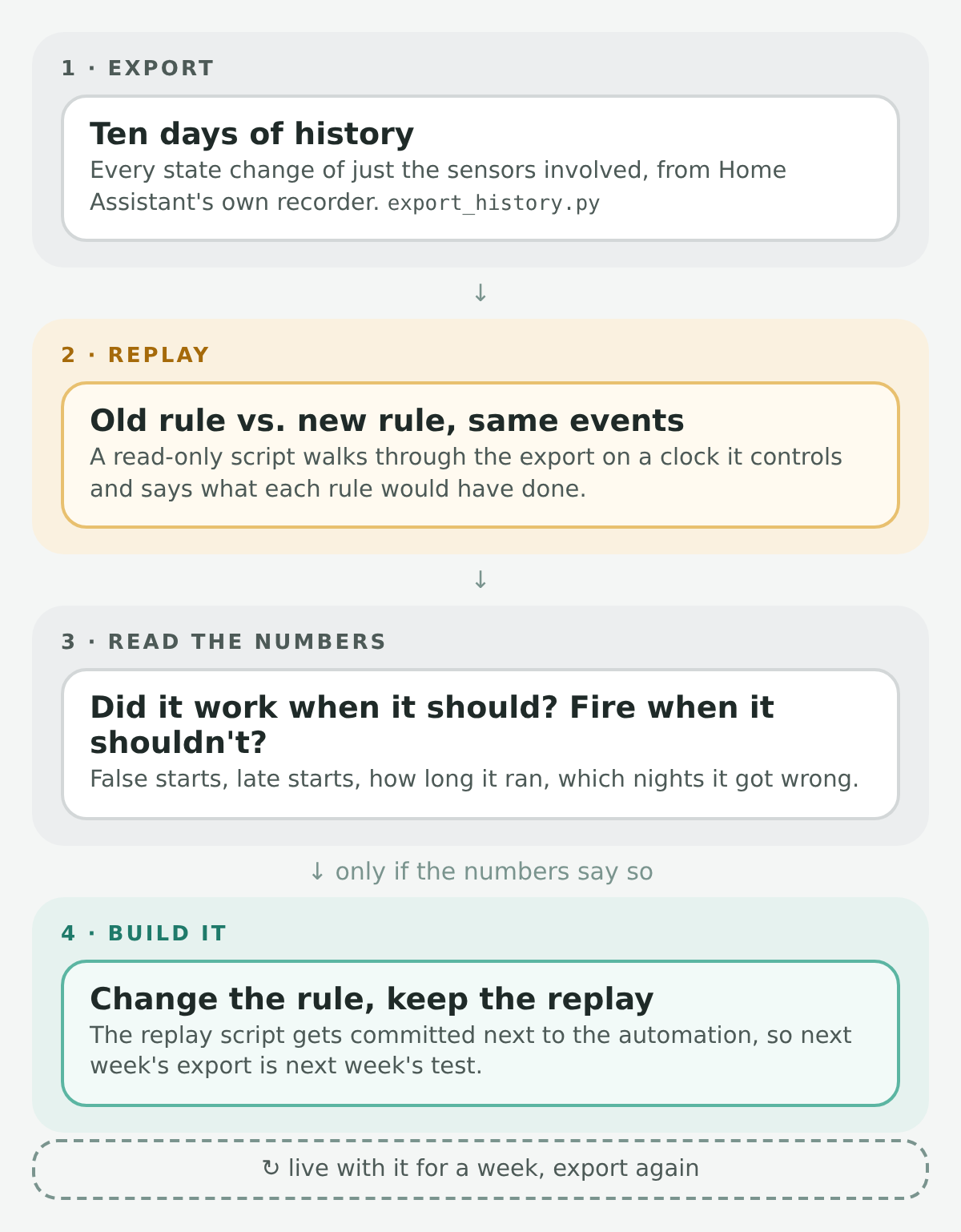 The whole method. Everything above "Build it" is read-only.
 What the Two Sensors Actually Do
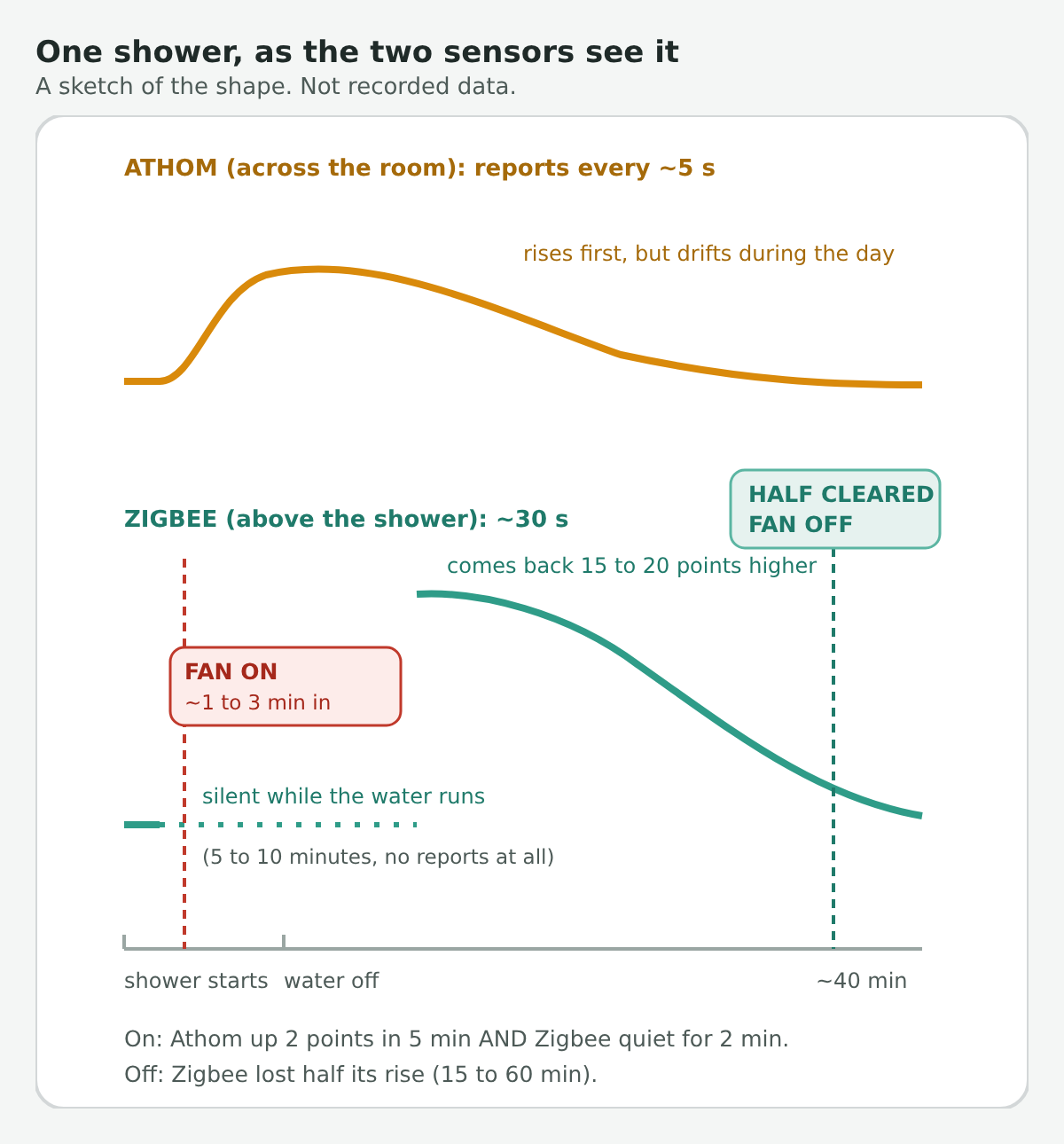 A sketch of the shapes, not real data. I'd rather say that than make up a pretty curve.
 What the Replay Said
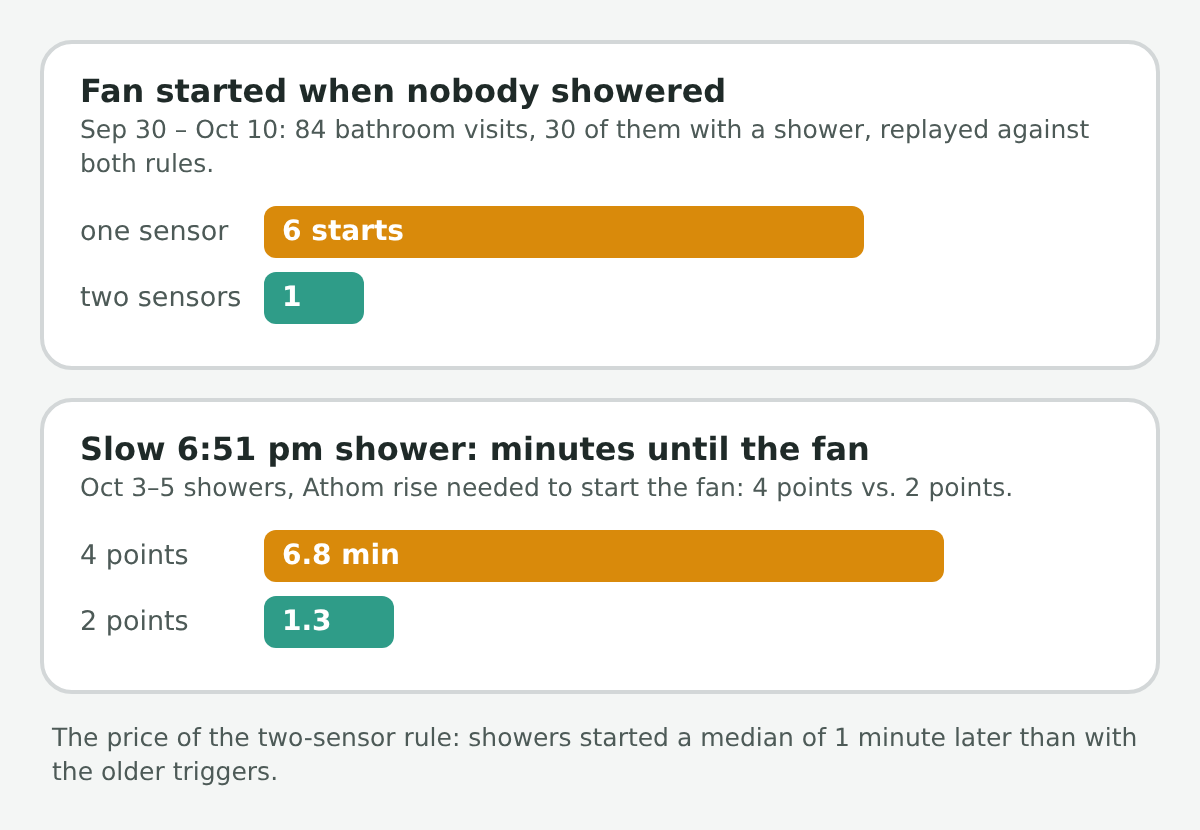 Same events, old rule and new rule. The footnote matters: nothing is free.
 The Night Mode That Wouldn't Stay On
Clue Likely if night mode Likely if not Jon or Lauren is home 0.98 0.47 Presence sensor has been on 15+ minutes 0.94 0.02 Presence sensor has been off 10+ minutes 0.02 0.72 Lights were turned off by a person, someone seen in the last 3 minutes 0.95 0.04 After 9 pm or before 7:30 am 0.85 0.20 replay_night_mode.py, learns them from the export. Here's the part I like: it learns from every night except the one it's testing, and does that for each night in turn. A rule that's only ever tested on the data it learned from will always look great.- platform: template
value_template: >
{% set p = states.binary_sensor.master_bedroom_presence %}
{{ is_state('light.master_bedroom_master', 'off') and p is not none
and not is_state('input_select.master_bedroom_lights_by', 'house_off')
and (p.state == 'on' or (p.state == 'off' and now() - p.last_changed < timedelta(minutes=3))) }}
prob_given_true: 0.95
prob_given_false: 0.04 Why It Flickered
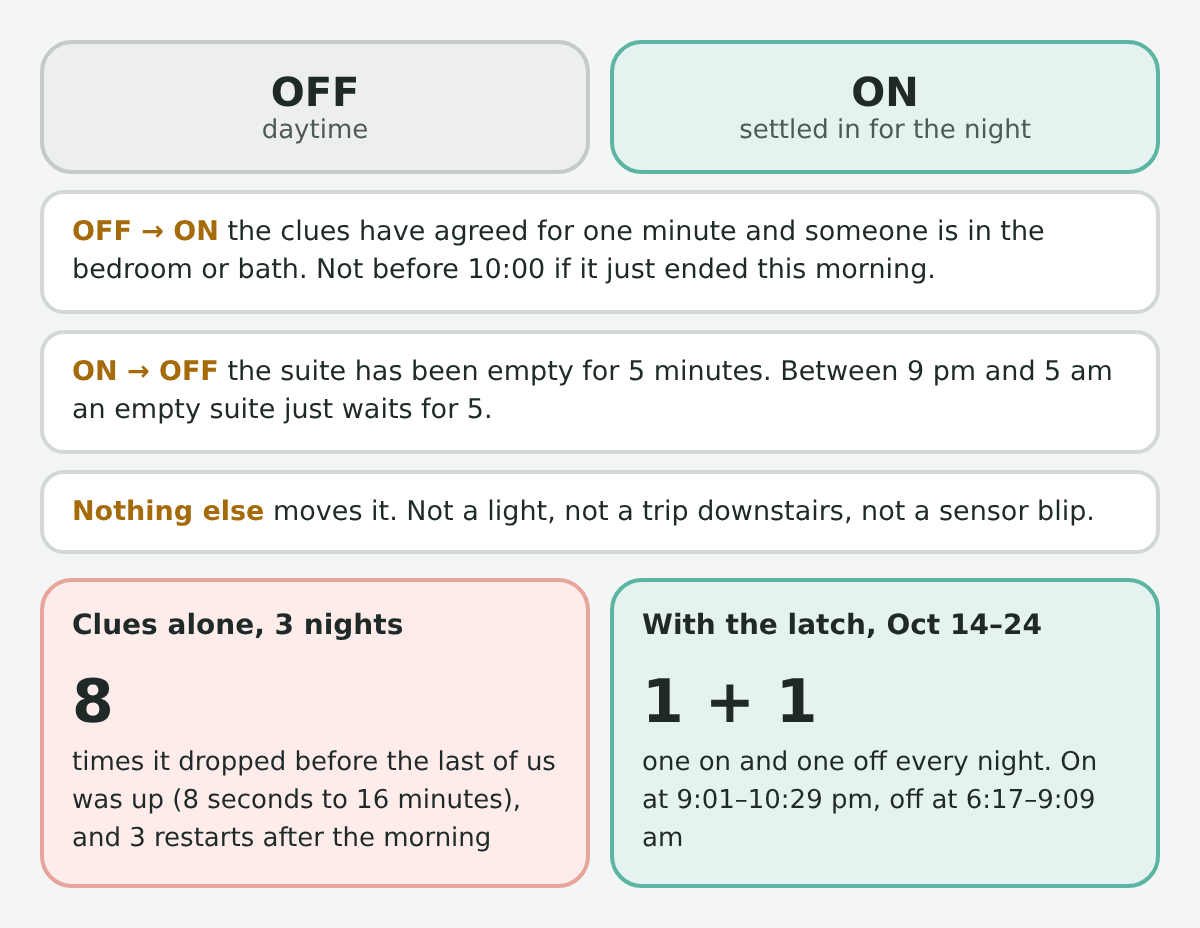 The rules fit on a card. The replay on the right is October 14 to 24.
 The Bug Only the Replay Could Find
input_select set to house_off when the house did it) and ignore those. The reason I trust that fix is that I could replay the morning against it. Things I'd Warn You About
Where Claude Fit
If You Want to Try This
end_time is required, or you only get one day).